


Websim
By Websim
Create and share interactive games, apps, and web experiences with AI.
Overview
Summary: Websim is an AI-powered creative platform that helps users build interactive websites, browser-based games, apps, and digital experiences using natural-language prompts. It enables users to experiment with ideas, generate web content, and create shareable online experiences without extensive coding knowledge.
What is Websim?
Websim is an AI-driven web creation platform designed for rapid prototyping, creative experimentation, and interactive digital experiences. Users can describe an idea through a prompt and explore generated websites, simulations, games, and app concepts. It supports a creative, prompt-based approach to web development, making it useful for designers, developers, students, and anyone interested in AI-assisted creation. Users can explore existing creations, customize their ideas, and share projects online.
Key Features:
-
Prompt-Based Creation: Turn text descriptions into interactive web experiences.
-
AI-Assisted Prototyping: Experiment with website layouts, app concepts, and creative ideas.
-
Interactive Experiences: Create browser-based games, simulations, and experimental websites.
-
Creative Exploration: Test unconventional concepts and explore AI-generated web content.
-
Sharing and Discovery: Explore and share web creations with other users.
Screenshots & Demo
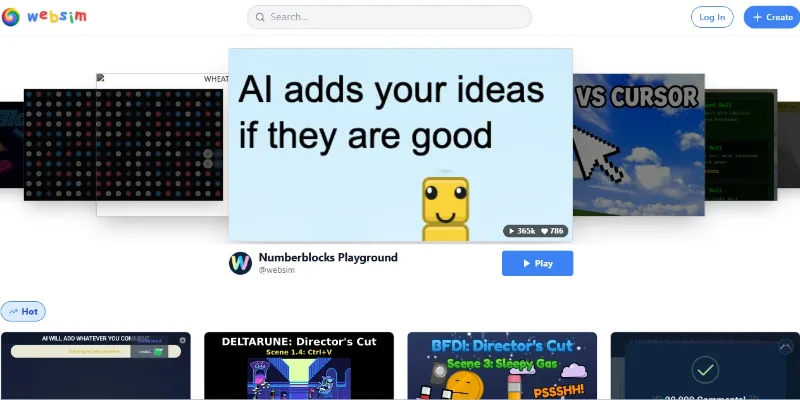
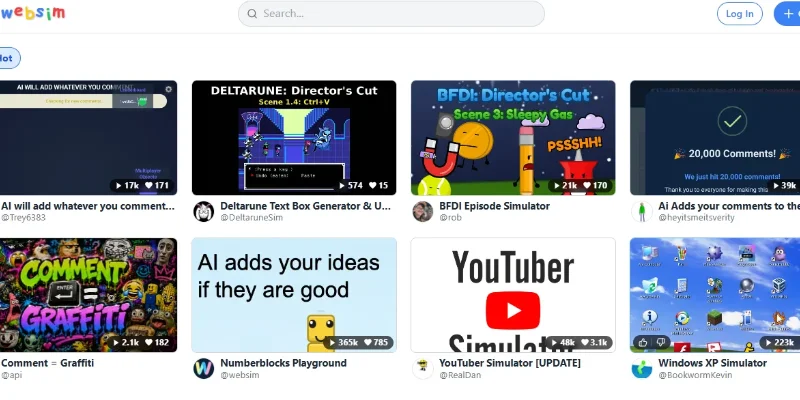
Key Features
Core capabilities and functionalities provided by Websim.
AI-Powered Website and App Creation
Websim transforms natural-language prompts into interactive web experiences, games, and apps. Users can describe an idea and let AI generate the underlying code, making rapid prototyping accessible without requiring extensive programming knowledge.
Interactive Games and Simulations
Create browser-based games, simulated environments, and interactive experiments. Websim supports creative projects that users can play, test, refine, and share directly through the web.
Community Sharing and Remixing
Websim provides a community feed where users can discover projects, publish their own creations, and receive feedback. Other users can like, comment on, and remix projects, encouraging collaborative experimentation and creative inspiration.
Browser-Based Creative Workspace
Websim runs through a web interface, allowing users to create and explore projects without installing a traditional desktop development environment. Its prompt-driven workflow is designed to make experimentation approachable for beginners and experienced creators alike.
Pros & Cons
Key strengths and potential limitations of Websim.
What We Like
- Fast AI-Powered Website Creation: Websim allows users to turn natural-language prompts into interactive websites and web experiences. This makes it easier to experiment with ideas and build prototypes without writing every line of code manually.
- Creative Freedom and Experimentation: Unlike traditional website builders, Websim encourages users to explore unusual concepts, fictional websites, simulations, and experimental interfaces. It is particularly useful for creative projects and testing new ideas.
- Interactive Games and Experiences: Users can create browser-based games, interactive pages, and simulations, making Websim useful beyond conventional website design. This flexibility appeals to hobbyists, students, designers, and developers.
- Accessible to Beginners: The prompt-based workflow lowers the barrier to entry for people with limited programming experience. Users can describe what they want to create and refine the results through experimentation rather than starting with a blank code editor
- Inspiration and Community Discovery: Websim provides opportunities to explore creative web experiences and learn from existing projects. Browsing other creations can help users discover new ideas, understand different approaches, and develop their own interactive concepts.
Where It Falls Short
- Inconsistent AI-Generated Results: Generated websites and applications may not always match the original prompt. Users may need multiple iterations, additional instructions, or manual code adjustments to achieve the desired result.
- Limited Control Over Complex Projects: Building sophisticated applications with complex business logic, extensive databases, authentication, or production-grade infrastructure may require additional development tools and technical expertise.
- Potential Bugs and Reliability Issues: AI-generated code can contain errors, broken interactions, layout problems, or compatibility issues. Complex projects may require debugging and testing before they are suitable for real-world use.
- Pricing and Usage Limitations: Free access may come with restrictions on credits, usage, or available capabilities. Users who experiment frequently or build larger projects should check the latest pricing plans and limits before committing to the platform.
- Not a Complete Replacement for Professional Development: Websim is useful for experimentation and rapid prototyping, but generated projects may still need security reviews, accessibility testing, performance optimization, and manual development before being deployed as reliable production applications.
Use Cases
Discover common workflows and scenarios where Websim excels.
AI Website Prototyping
Create website concepts from natural-language prompts. Experiment with layouts, navigation, page structures, and interactive elements before committing to full development.
Interactive Game Development
Build browser-based games and playful experiences by describing game mechanics, characters, rules, and visual styles. Refine gameplay through repeated prompts and experimentation.
Creative Web Experiments
Explore fictional websites, unusual interfaces, digital simulations, and imaginative online experiences. Websim is useful for creators who want to test ideas beyond conventional website design.
Landing Page Design
Generate landing page concepts for products, services, campaigns, and startups. Explore different headlines, layouts, calls to action, and visual directions to develop initial design ideas
App Concept Development
Turn early-stage application ideas into interactive prototypes. Demonstrate potential screens, user flows, and interface concepts before investing in a complete application.
UI/UX Design Exploration
Experiment with navigation menus, buttons, dashboards, page layouts, and user interactions. Compare different interface approaches and use the results to inform design decisions
Coding and Learning
Explore how interactive web experiences work and experiment with generated code. Beginners can learn through practical examples, while developers can use prototypes to test concepts quickly.
Educational Simulations
Create interactive demonstrations, simple learning tools, and browser-based simulations. Educators and students can experiment with concepts through engaging digital experiences.
Similar AI Tools




Latest from Our Blog
Tips, tutorials and insights about AI tools and how to use them effectively.

Best AI Tools for Real Estate Agents in 2026: Listings, Leads & Follow-Up

Google Gemini vs ChatGPT: Which AI Assistant Should You Actually Use?

8 Best Midjourney Alternatives in 2026 (Free and Paid)

15 Best AI Tools for Freelance Writers in 2026 (Tested & Ranked)
Reviews & Community Ratings
Average rating: 5.0 out of 5 (1 total reviews)
Rate Websim
Community Reviews (0)