

Best AI Tools for Social Media and Thumbnails in 2026
Best AI tools for social media visuals and YouTube thumbnails. Compare image generators, thumbnail makers, and design tools to create engaging content, maintain brand consistency, and boost clicks without overspending.
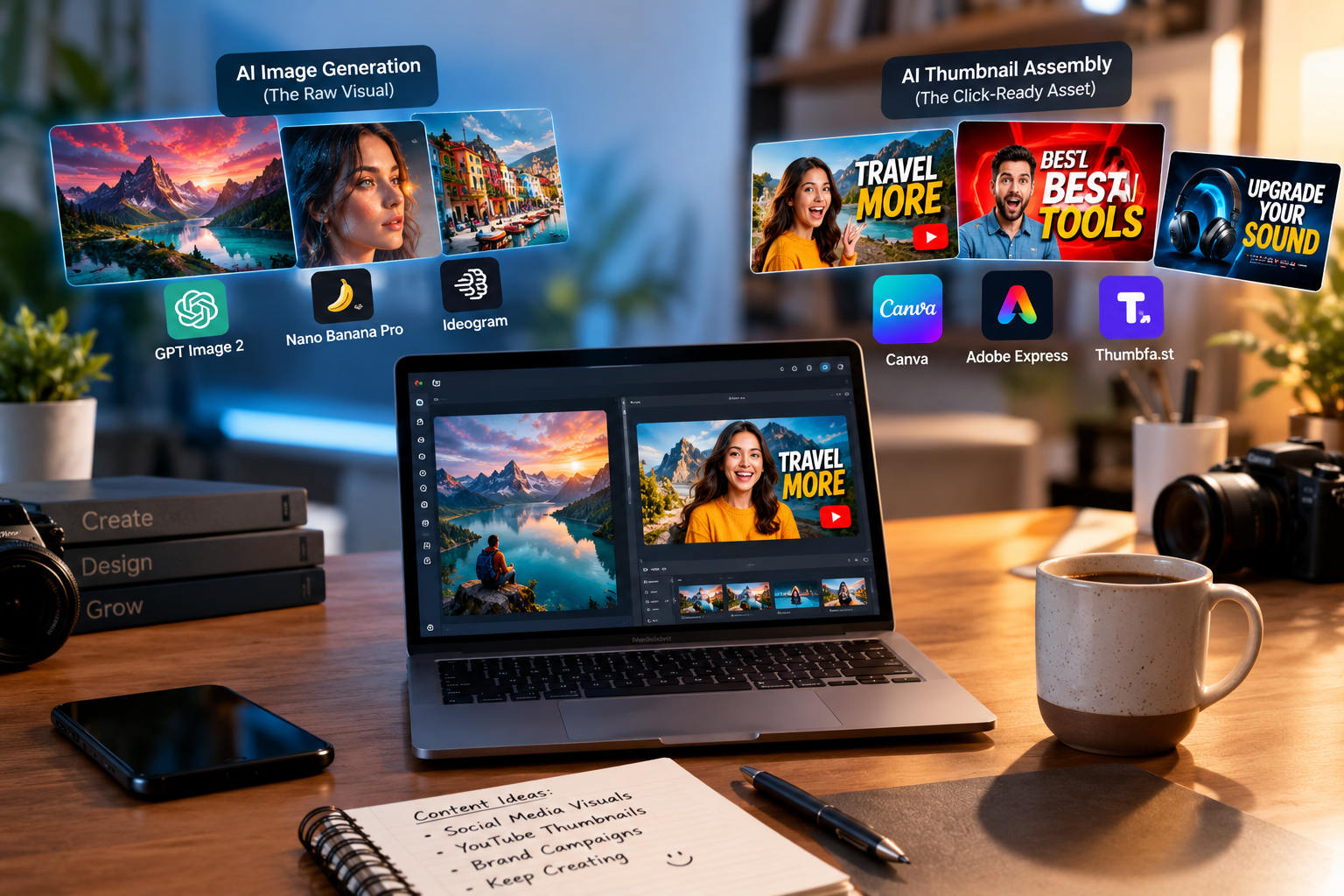
The best AI tools for social media and thumbnails split into two layers: generation (creating visuals from scratch with Nano Banana Pro, Ideogram, or GPT Image 2) and assembly (adding faces, text, and brand elements with Canva, Adobe Express, or Thumbfa.st). Most creators only need one tool from each layer—and AIToolsZone is the fastest way to compare them side-by-side.
Key Takeaways
-
Two layers, not one: AI image generators and AI thumbnail assemblers solve different problems. Confusing them is the #1 reason creators waste money.
-
For social media visuals: Canva Magic Studio and Adobe Express cover 80% of needs; Ideogram wins when text must be readable inside the image.
-
For YouTube thumbnails: Thumbfa.st (face consistency) and Pikzels (CTR optimization) are built for clicks, not just aesthetics.
-
The 10% test: Shrink any thumbnail to 10% size before publishing. If you cannot read the focal point, viewers cannot either.
-
Compare before you buy: AIToolsZone lets you filter by use case, budget, and platform—so you can see the exact tools that match your workflow, not a generic list.
What Is the Difference Between AI Image Generation and AI Thumbnail Assembly?
Most "AI thumbnail" lists fail because they mix two different jobs. AI image generation creates a visual from a prompt. AI thumbnail assembly takes existing assets (your face, a product shot, a logo) and builds a click-ready layout. They are not interchangeable.
Layer 1: AI Image Generation (The Raw Visual)
This is the "text-to-image" layer. You type a prompt, and the model returns a 16:9 concept. The leaders in 2026 are GPT Image 2, Nano Banana Pro (Gemini), and Ideogram.
-
GPT Image 2 leads live blind-comparison rankings for general thumbnail concepts, but a general image winner is not automatically best at faces or text-safe composition.
-
Nano Banana Pro is strongest for face-led thumbnails where the subject must look accurate and high-resolution.
-
Ideogram is the text specialist: it bakes readable words directly into the image, which is critical for text-heavy social graphics.
Use this layer when: You need a concept, a background, or a fully generated visual that does not exist yet.
Layer 2: AI Thumbnail Assembly (The Click-Ready Asset)
This is the "put it together" layer. You bring your face, brand colors, and headline text; the tool handles layout, background removal, and export sizing. The leaders are Canva Magic Studio, Adobe Express (Firefly), Thumbfa.st, and StreamYard's native thumbnail flow.
-
Canva Magic Studio is the best editor in the category, but it is not a CTR specialist—it is design software with AI bolted on.
-
Thumbfa.st is built specifically for creators who want their exact face likeness across every thumbnail, with up to four variations per generation.
-
StreamYard keeps thumbnail creation inside the scheduling flow, using local background removal so you do not have to export and re-upload.
Use this layer when: You already have the visual idea and need to turn it into a platform-ready thumbnail without opening Photoshop.
Why Most Creators Overpay by Mixing the Layers
Creators often buy a premium image generator (Layer 1) expecting it to produce click-ready thumbnails, then discover they still need a design tool (Layer 2) to add text and faces. The reverse is also true: buying a design tool expecting it to invent concepts from scratch. The fix is one tool per layer—not three tools per layer.
The Best AI Tools for Social Media Visuals
Canva Magic Studio (The All-Rounder)
Canva is the safest first purchase for social media visuals because it covers templates, brand kits, background removal, and AI image generation in one place. Magic Layers turns AI-generated images into editable layers, so you can move elements and fix text instead of starting over.
Price: Free tier available; paid plans from $12/month billed annually.
Best for: Solo marketers and lean teams who need to ship polished visuals daily without a designer.
Adobe Express + Firefly (The Commercial-Safe Choice)
Adobe Express is the better pick when commercial safety matters. Firefly is trained on licensed content, so the output is safe for client work and brand campaigns. It also integrates with Photoshop and Illustrator if you already pay for Creative Cloud.
Price: Free tier available; premium from $9.99/month.
Best for: Agencies and teams that cannot risk copyright ambiguity in AI-generated visuals.
Ideogram (The Text-Rendering Specialist)
Ideogram is not a full design suite—it is a text-rendering engine. When your social graphic needs a bold headline baked directly into the image (quotes, announcements, meme formats), Ideogram produces readable text where most generators produce gibberish.
Price: Free limited tier; paid from $15/month billed annually.
Best for: Creators who publish text-heavy graphics on Instagram, LinkedIn, or X.
CapCut and OpusClip (For Video-First Social)
If your social strategy is short-form video, CapCut handles editing and captions, while OpusClip repurposes long-form content into clips with AI-selected highlights. These are not thumbnail tools, but they are essential for a complete social stack.
Price: CapCut free tier; OpusClip paid from $15/month.
Best for: TikTok, Reels, and Shorts creators.
The Best AI Thumbnail Makers for YouTube and Social Covers
Thumbfa.st (Face-Locked Consistency)
Thumbfa.st is built for creators who appear in every thumbnail. Upload a photo once to create a "Person" profile, and the tool locks your exact likeness across designs. It also accepts a YouTube thumbnail URL as inspiration, analyzes the style, and recreates that vibe with your assets.
Price: $19/month.
Best for: YouTubers and streamers who want a consistent on-camera brand.
Pikzels (CTR-Optimized for YouTube)
Pikzels is not a generic image generator—it is a CTR-first thumbnail maker trained on YouTube click patterns. It specializes in faces and bulk variants, making it the stronger pick when your bottleneck is packaging that competes with large channels.
Price: Trial available; paid roughly $14–$20/month.
Best for: YouTube creators who need scroll-stopping packaging, not just a pretty image.
Thumblore and ThumbnailPilot (Speed and A/B Testing)
Thumblore turns a video title into two scroll-stopping thumbnails in about five seconds, with an average 83% CTR lift reported by creators who switched (a vendor-reported figure worth validating on your own channel). ThumbnailPilot adds a preview feature so you can see how the thumbnail looks inside YouTube's interface before publishing.
Price: Thumblore from $9/month**; ThumbnailPilot from **$20/month.
Best for: Creators who publish frequently and need fast iteration.
Canva vs. Adobe Express for Thumbnails (The Honest Comparison)
| Criterion | Canva Magic Studio | Adobe Express |
|---|---|---|
| Best for | Templates, brand kits, team collaboration | Commercial-safe AI (Firefly), Adobe ecosystem |
| Thumbnail-specific AI | Magic Layers (editable AI images) | Firefly text-to-image |
| CTR optimization | No native CTR scoring | No native CTR scoring |
| Price | Free; paid from $12/mo | Free; paid from $9.99/mo |
| Verdict | Better all-round social editor | Better for brand-safe commercial work |
Neither is a CTR specialist. If clicks are the goal, pair one of these with a dedicated tester like ThumbnailAI (score existing thumbs) or Pikzels (generate CTR-optimized variants).
Which AI Thumbnail Tool Actually Gets Clicks?
The 10% Size Test (Before You Publish)
Shrink your thumbnail to 10% of its full size and look at it on a phone. At feed size, viewers should recognize the subject, feel the tension, and understand the payoff. If the focal point disappears, the thumbnail fails—no matter how impressive the full-size image looks.
CTR Scores vs. A/B Testing: What Data Actually Tells You
A CTR score (like Pixado's ThumbScore or ThumbnailAI's analysis) predicts performance based on patterns from high-performing thumbnails. A/B testing measures real viewer behavior on your actual channel. The score is a useful filter before you publish; the A/B test is the only proof that matters after. Use both, but trust the test.
The "One Visual Noun" Rule for Higher CTR
At phone size, a thumbnail should contain one visual noun—a face, an object, a place, or a result—not six competing signals. Separation (light, color, scale, empty space) isolates that noun. The image should add information, not repeat the video title. And the curiosity should come from a real gap the video closes, not clickbait.
How to Build Your Creator Stack Without Wasting Money
The $20 Rule for Social + Thumbnail Tools
Most creators only need one tool from each layer:
-
Layer 1 (Generation): Ideogram ($15/mo) or Nano Banana Pro ($10/mo) for raw visuals.
-
Layer 2 (Assembly): Canva ($12/mo) or Thumbfa.st ($19/mo) for click-ready layouts.
That is $25–$35/month for a complete stack. If you are paying for three generators and two assemblers, you are overpaying for overlap.
When to Use a Generator vs. an Assembler
| Your situation | Use Layer 1 (Generation) | Use Layer 2 (Assembly) |
|---|---|---|
| You have no visual idea | Yes | No |
| You have a photo of yourself | No | Yes (for face-locking) |
| You need text baked into the image | Yes (Ideogram) | Optional |
| You need a 1280×720 export | No | Yes |
| You need 10 variants for A/B testing | Yes (generate concepts) | Yes (assemble variants) |
How to Compare Tools on AIToolsZone Before You Buy
The fastest way to avoid overlap is to compare tools by use case, budget, and platform before committing. AIToolsZone is built for exactly this: it filters AI tools by what you actually care about—your industry, your use case, your budget—so you can see the thumbnail generators, social visual editors, and video repurposers that match your workflow without scrolling through a generic list.
The platform is curated and spam-free, meaning the tools you see are inspected for live functionality and transparent pricing. For creators who are tired of opening ten tabs to compare two tools, it is the shortest path from "I need a thumbnail tool" to "I bought the right one."
Discover Tools Mentioned in this Guide
Explore our curated database of 2,600+ verified artificial intelligence software, benchmarks, and honest user reviews.