

Airtap
By Airtap
Next-generation AI code assistant with deep multi-file repository understanding.
Overview
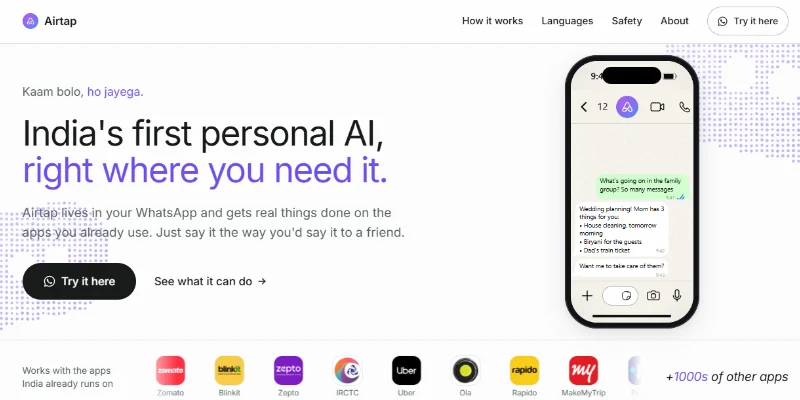
Summary:Airtap is a personal AI agent that helps users automate everyday tasks by operating the apps they already use. Through messaging, users can ask Airtap to book travel, order groceries, summarize conversations, manage schedules, research information, and complete multi-step workflows. Its India-focused version integrates with WhatsApp and popular Indian services, including IRCTC, Swiggy, Zomato, Uber, and UPI payment apps. Rather than simply providing suggestions, Airtap is designed to carry out tasks and report the results, with user approval for important actions.
What is Airtap?
Airtap is an AI-powered personal automation platform that connects conversational AI with real app interactions. Users can send requests in natural language through supported messaging channels and let Airtap navigate apps, enter information, perform actions, and return updates.
Its technology combines three main components: an AI system for understanding requests and managing context, an automation layer called AutoPilot that interacts with apps, and a cloud phone or compatible physical device where those actions take place. This approach enables workflows that extend beyond ordinary web browsing and into supported mobile applications.
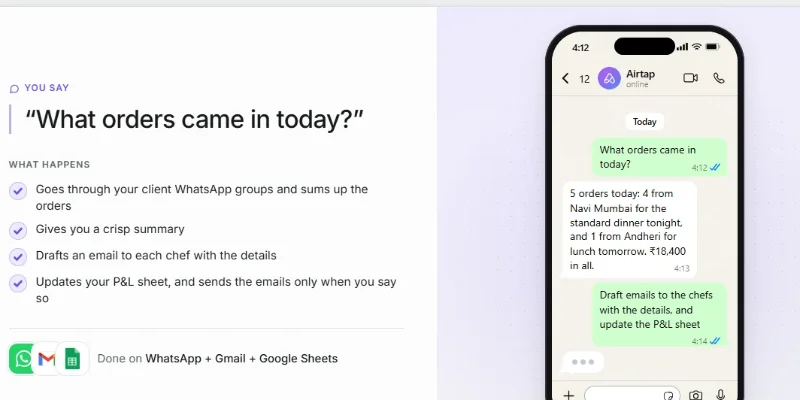
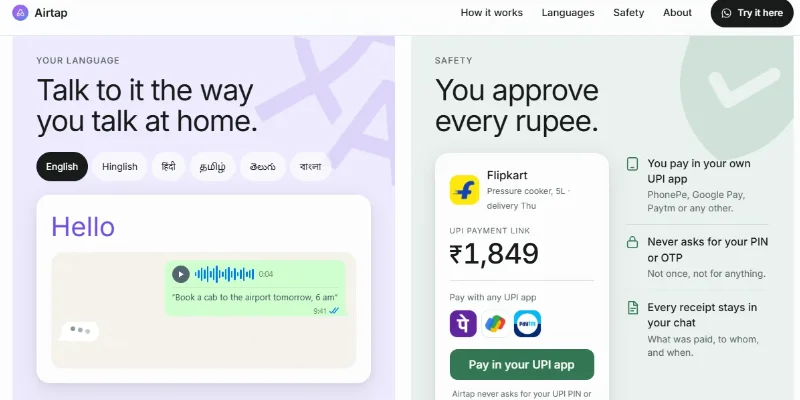
Airtap can help users summarize WhatsApp conversations, draft emails, update spreadsheets, book train tickets and cabs, reorder groceries, monitor information, and save recurring tasks as automated routines. Its India-focused experience also emphasizes local services, multilingual communication, and UPI payments. The platform states that users authorize payments in their own UPI apps and that Airtap does not ask for their UPI PIN or OTP.
Verifiable Stats
-
Official Website: https://airtap.ai/in
-
Tool Type: Personal AI Agent / AI App Automation
-
Primary Interface: WhatsApp messaging for the India-focused experience; other messaging channels and a web interface are also documented.
-
Core Technology: AI reasoning, persistent context, app interaction through AutoPilot, and cloud or physical device support.
-
Supported Indian Services: Advertises integrations with services including IRCTC, Swiggy, Zomato, Blinkit, Zepto, Uber, Ola, DigiLocker, and Parivahan. Actual availability may vary.
Screenshots & Demo
Key Features
Core capabilities and functionalities provided by Airtap.
Context-Aware Code Completion & Synthesis
Delivers low-latency inline code completions, multi-token suggestions, and semantic completions customized to the repository context.
Multi-File Codebase Indexing & Exploration
Deeply scans project files, dependency trees, and symbol references to provide comprehensive cross-file edits and refactorings.
Automated Git & Terminal Workflow Automation
Executes shell commands, analyzes test runs, resolves syntax and runtime bugs, and crafts clean commit messages and pull requests.
Architectural Refactoring & Security Audit
Spots security vulnerabilities, dead code paths, and architectural smells, providing one-click semantic fixes and unit tests.
Pros & Cons
Key strengths and potential limitations of Airtap.
What We Like
- Automates Real App Tasks: Goes beyond answering questions by interacting with supported apps to complete multi-step workflows
- WhatsApp-Based Access: Lets users submit requests through a familiar messaging interface, reducing the need to switch between different applications.
- India-Focused Integrations: Supports workflows involving services such as IRCTC, Swiggy, Zomato, Uber, and other Indian apps, subject to current availability.
- Multilingual Interaction: Advertises support for English, Hindi, Hinglish, and several regional Indian languages.
- Personalized Automation: Can maintain context, schedule routines, and help automate recurring tasks such as reminders, research, and app-based workflows.
Where It Falls Short
- Limited Access: The service may require an invitation or have restricted availability, depending on the current rollout.
- Daily Usage Caps: Free access during the building phase comes with usage limits that may restrict frequent or complex workflows.
- Dependence on Supported Apps: Task completion depends on app compatibility, available integrations, and changes to third-party interfaces.
- Sensitive Account Permissions: Automating messaging, bookings, or payments requires careful consideration of privacy, security, and user authorization.
- Execution Can Fail: Multi-step workflows may encounter login issues, app changes, network problems, or unexpected screens, so important actions should be verified.
Use Cases
Discover common workflows and scenarios where Airtap excels.
Personal Task Automation
Delegate routine tasks to an AI agent through natural-language messages. Airtap can help coordinate supported actions across apps without requiring users to navigate every screen manually.
Train Ticket Booking Assistance
Use Airtap to assist with train-ticket booking workflows through supported services such as IRCTC. Availability checks, passenger details, and final booking status should be verified before relying on a reservation.
Food Delivery and Grocery Ordering
Request help with food orders or grocery shopping through supported services such as Swiggy, Zomato, Blinkit, and Zepto. Confirm the items, address, total price, and order before completing a purchase.
Cab Booking
Use Airtap to assist with ride-booking workflows through compatible services such as Uber and Ola, including checking options and coordinating the booking process.
WhatsApp Conversation Summaries
Summarize supported conversations to identify important messages, action items, and follow-ups without manually reviewing every message.
Email Management
Automate supported email workflows, such as finding relevant messages, summarizing inbox content, and preparing drafts for review before sending.
Calendar and Schedule Management
Use supported calendar integrations to organize events, review upcoming commitments, and coordinate reminders or scheduling tasks.
Spreadsheet Automation
Work with supported spreadsheet applications such as Google Sheets to update information, organize records, and streamline repetitive data-entry tasks.
Similar AI Tools







Latest from Our Blog
Tips, tutorials and insights about AI tools and how to use them effectively.

ChatGPT for Brand Voice: Can It Sound Like You?

ChatGPT for Marketing: The Complete 2026 Guide

Best AI Tools for Real Estate Agents in 2026: Listings, Leads and Follow-Up

Google Gemini vs ChatGPT: Which AI Assistant Should You Actually Use?
Reviews & Community Ratings
Average rating: 8.5 out of 5 (1 total reviews)
Rate Airtap
Community Reviews (0)