

Astorie
By Astorie
Next-generation AI code assistant with deep multi-file repository understanding.
Overview
Summary
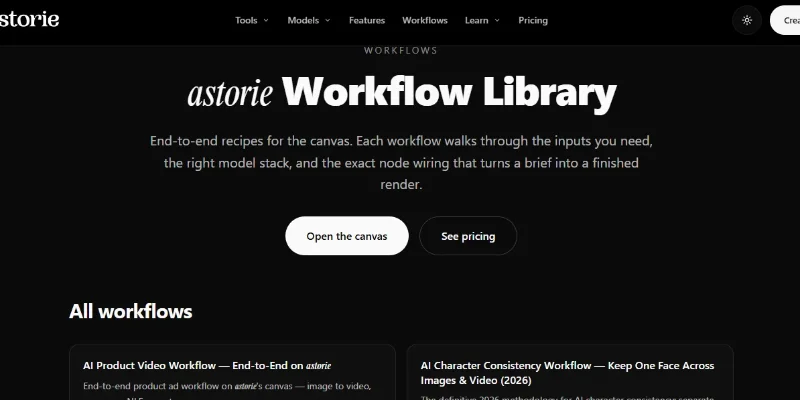
Astorie is an AI-powered creative platform that helps users generate, edit, and combine images, videos, audio, text, and 3D content through a visual, node-based workspace. Instead of switching between separate AI applications, creators can connect different models and generation steps to build complete creative workflows, from initial image generation to animated video, voiceovers, music, and finished sequences. Astorie supports models from multiple providers, including OpenAI, Google, Anthropic, Runway, Kling, ElevenLabs, and Suno. It offers a free plan with limited credits and paid subscriptions with higher allowances and additional capabilities.
What Is Astorie?
Astorie is a cloud-based AI creative canvas designed for creators who want to build multi-step media projects in one workspace. Each step appears as a node representing a task such as generating an image, creating a video, producing audio, writing text, or editing an existing asset. Users connect compatible nodes to pass outputs between models, create alternative versions, and refine individual steps without rebuilding the entire workflow.
The platform combines AI image generation and editing, text-to-video and image-to-video creation, character consistency, storyboarding, voiceovers, music generation, lip-sync, and selected 3D and world-generation tools. Users can choose from supported models, adjust model-specific parameters, preview results, and monitor credit costs before running generation tasks.
Astorie is intended for content creators, filmmakers, designers, e-commerce businesses, marketing teams, and collaborative creative studios. Its cloud-based interface does not require users to install AI models or maintain their own GPU infrastructure. Personal projects and team workspaces support different collaboration needs, while paid plans provide additional credits, model access, and higher generation capacity.
Verifiable Stats
-
Six Feature Categories: Astorie organizes its advertised capabilities into six categories: Video, Image, Audio, Workflow, Editing, and 3D & World.
-
11 Video Features: The official features page lists 11 video workflows, including image-to-video, text-to-video, multi-shot video, product videos, explainer videos, and video-to-video editing.
-
16 Image Features: Its image category lists 16 capabilities, including image generation, style transfer, photo restoration, product photography, headshots, logos, mockups, and character consistency.
-
Four Audio Features: The official feature catalogue lists four audio workflows covering voiceovers, sound effects, voice cloning, and AI-generated music.
-
Multiple AI Model Providers: Astorie integrates models from providers such as OpenAI, Anthropic, Google, FAL, Runway, Kling, Hailuo, ElevenLabs, and Suno. Available models vary by feature and plan.
-
Node-Based Workflow System: Each canvas node represents a generation or editing step, with compatible connections allowing outputs from one task to become inputs for another. Users can rerun individual nodes when revising a project.
-
Image and Video Production: Supported workflows include image animation, multi-shot storyboards, product advertisements, talking-head videos, and character-consistent scenes.
-
Audio and Lip-Sync Tools: Users can generate voiceovers, music, and sound effects, then connect audio with supported video and lip-sync workflows.
-
Free and Paid Plans: Astorie offers a free plan without requiring a credit card, as well as Standard, Pro, and Ultimate subscriptions. The official pricing page lists different monthly credit allowances and generation limits for each plan.
-
Team Collaboration: Astorie supports shared workspaces for organizing creative projects and collaborating with other users. Workspace visibility and sharing settings depend on the project context.
Screenshots & Demo


Key Features
Core capabilities and functionalities provided by Astorie.
Context-Aware Code Completion & Synthesis
Delivers low-latency inline code completions, multi-token suggestions, and semantic completions customized to the repository context.
Multi-File Codebase Indexing & Exploration
Deeply scans project files, dependency trees, and symbol references to provide comprehensive cross-file edits and refactorings.
Automated Git & Terminal Workflow Automation
Executes shell commands, analyzes test runs, resolves syntax and runtime bugs, and crafts clean commit messages and pull requests.
Architectural Refactoring & Security Audit
Spots security vulnerabilities, dead code paths, and architectural smells, providing one-click semantic fixes and unit tests.
Native IDE & CLI Integration
Seamlessly operates within developer terminals and mainstream code editors without interrupting daily engineering flow.
Pros & Cons
Key strengths and potential limitations of Astorie.
What We Like
- All-in-One AI Creative Workspace: Combines image, video, audio, text, and 3D generation in one platform, reducing the need to switch between multiple creative tools.
- Visual Node-Based Workflows: Lets users connect generation steps on an interactive canvas, making it easier to build and revise multi-step creative projects.
- Multiple AI Models: Provides access to models from providers such as OpenAI, Google, Runway, Kling, ElevenLabs, and Suno, offering flexibility across creative tasks.
- Powerful Video and Image Editing: Supports image-to-video generation, video enhancement, background removal, style transfer, lip-sync, and other creative editing tools
- Credit Costs Shown Before Generation: Displays the estimated credit cost for each node before running it, helping users compare options and manage usage.
Where It Falls Short
- Learning Curve for Beginners: The node-based canvas and connected workflows may take time to understand, especially for users accustomed to simple prompt-based tools
- Credit-Based Usage Limits: Video, audio, and high-resolution generations can consume credits quickly, particularly when producing multiple variations.
- Free-Plan Restrictions: The free plan provides limited monthly credits, while commercial-use rights and additional capabilities may require a paid subscription.
- Complex Workflows Need Planning: Connections between nodes must use compatible inputs and outputs, so users may need to troubleshoot invalid connections or adjust their workflow.
- Desktop Required for Editing: The canvas is currently read-only on mobile and tablet devices, so creating and modifying workflows requires a desktop or laptop browser.
Use Cases
Discover common workflows and scenarios where Astorie excels.
AI Video Creation
Generate videos from text prompts, images, and supported reference inputs. Creators can experiment with scenes, visual styles, and motion using available AI video models.
Image-to-Video Animation
Turn still images into animated video clips by connecting image and video generation nodes in a visual workflow.
AI Image Generation
Create original visuals from text prompts for creative projects, social media content, marketing campaigns, and digital publications.
Product Photography and Advertising
Generate product images, promotional visuals, and product-focused video content for online stores, advertising campaigns, and brand presentations.
AI Image Editing and Enhancement
Improve existing images using tools such as background removal, style transfer, image upscaling, recoloring, and restoration.
Consistent Character Creation
Develop character-based visual content and maintain character consistency across supported image and video generation workflows.
Storyboard and Multi-Scene Production
Plan visual stories by creating storyboards and connecting multiple generation steps to develop sequences for short films, advertisements, and social media videos.
AI Voiceovers and Narration
Generate voiceovers for explainers, presentations, tutorials, and promotional videos using supported audio-generation tools.
Similar AI Tools





Latest from Our Blog
Tips, tutorials and insights about AI tools and how to use them effectively.

ChatGPT for Brand Voice: Can It Sound Like You?

ChatGPT for Marketing: The Complete 2026 Guide

Best AI Tools for Real Estate Agents in 2026: Listings, Leads and Follow-Up

Google Gemini vs ChatGPT: Which AI Assistant Should You Actually Use?
Reviews & Community Ratings
Average rating: 8.5 out of 5 (1 total reviews)
Rate Astorie
Community Reviews (0)