

Audio Converter AI
By Audio Converter AI
State-of-the-art AI music creation app generating multi-genre musical arrangements.
Overview
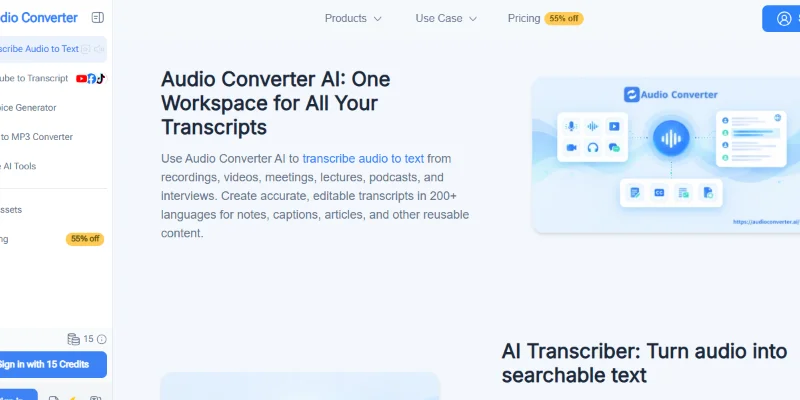
Summary: Audio Converter AI is an AI-powered audio and video transcription platform that converts recordings, videos, YouTube links, and other supported media into editable text. It combines speech-to-text transcription, speaker recognition, timestamps, AI-generated summaries, meeting notes, multilingual translation, text-to-speech, voice changing, and audio conversion in one online workspace. Supporting more than 200 languages according to its website, the platform helps students, educators, professionals, and content creators turn recordings into searchable transcripts, subtitles, study notes, articles, and reusable content. A free plan is available, with paid subscriptions offering additional credits, larger file allowances, and expanded voice-generation capabilities.
What is Audio Converter AI?
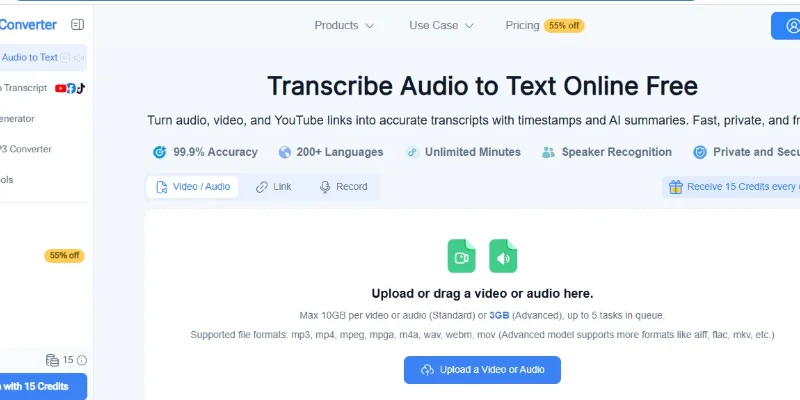
Audio Converter AI is a browser-based AI assistant designed to simplify audio processing, transcription, and voice-related tasks. Users can upload audio or video files, paste supported online media links, or record audio directly through the platform. The AI processes the content and generates editable transcripts that can include timestamps and speaker labels.
Its transcription tools support recordings of meetings, interviews, lectures, podcasts, webinars, and other spoken content. Users can review the transcript, correct errors, generate summaries, and export results in formats such as TXT, DOCX, SRT, VTT, and CSV. The platform also includes an AI meeting note taker that produces structured meeting minutes, summaries, and action items from recordings.
Beyond transcription, Audio Converter AI offers text-to-speech, AI voice generation, voice cloning, voice changing, custom voice design, PDF-to-audio conversion, and audio format conversion. These features support workflows such as creating voice-overs, producing spoken versions of documents, preparing audiobooks, and converting media between compatible formats.
The platform also supports multilingual transcription and translation, helping users work with recordings in different languages. Its AI Notes, AI Chat, and Mind Maps features provide additional ways to organize and explore information extracted from audio and video.
Audio Converter AI offers free introductory access and paid plans for users who need higher usage allowances or additional voice features. It is suitable for people who want to turn spoken content into usable information without manually transcribing recordings or switching between multiple audio tools.
Verifiable Stats
-
Tool Name: Audio Converter AI
-
Official Website: https://audioconverter.ai/
-
Tool Type: AI transcription, voice generation, and audio conversion platform.
-
Primary Function: Convert audio, video, and supported online media into editable text, summaries, and other reusable outputs.
-
Supported Languages: More than 200 languages, according to the official website.
-
Transcription Features: Speech-to-text conversion, editable transcripts, timestamps, and speaker recognition.
-
Input Sources: Local audio files, video files, supported YouTube links, and recordings made through the platform.
-
Supported Media Formats: Common formats include MP3, WAV, M4A, MP4, WebM, MOV, FLAC, AAC, OGG, MKV, and other formats depending on the feature.
-
Speaker Recognition: Identifies and labels different speakers in supported recordings.
-
AI Summaries: Generates concise summaries from transcripts to help users review long recordings.
-
Meeting Notes: Produces structured meeting minutes, summaries, and action items from uploaded recordings.
Screenshots & Demo
Key Features
Core capabilities and functionalities provided by Audio Converter AI.
Context-Aware Code Completion & Synthesis
Delivers low-latency inline code completions, multi-token suggestions, and semantic completions customized to the repository context.
Multi-File Codebase Indexing & Exploration
Deeply scans project files, dependency trees, and symbol references to provide comprehensive cross-file edits and refactorings.
Automated Git & Terminal Workflow Automation
Executes shell commands, analyzes test runs, resolves syntax and runtime bugs, and crafts clean commit messages and pull requests.
Architectural Refactoring & Security Audit
Spots security vulnerabilities, dead code paths, and architectural smells, providing one-click semantic fixes and unit tests.
Pros & Cons
Key strengths and potential limitations of Audio Converter AI.
What We Like
- Multilingual Transcription: Supports transcription across 200+ languages, according to the platform, making it useful for international audio and video content.
- Speaker Recognition and Timestamps: Helps identify different speakers and locate specific sections of a recording for easier review.
- AI-Powered Summaries: Converts recordings into concise summaries, meeting notes, and key points to reduce manual review time
- Multiple Audio and Video Tools: Combines transcription, text-to-speech, audio conversion, voice tools, and PDF-to-audio features in one platform.
- Free Plan Available: Users can try selected features with daily credits before deciding whether a paid subscription is necessary.
Where It Falls Short
- Free-Plan Limits: Daily credits, transcription duration, file sizes, and voice-generation allowances are restricted on the free tier.
- Paid Plans for Higher Usage: Frequent users may need a subscription to access larger limits and additional credits.
- Transcription Accuracy Can Vary: Background noise, strong accents, overlapping speakers, and recording quality can affect results.
- Feature-Specific Restrictions: Supported file formats, upload limits, and processing allowances may differ across tools and subscription plans.
- Privacy Considerations: Users should review the platform’s privacy policy before uploading confidential recordings, meetings, or sensitive documents.
Use Cases
Discover common workflows and scenarios where Audio Converter AI excels.
Audio and Video Transcription
Convert recorded audio, video files, and supported online videos into editable text. This is useful for interviews, lectures, podcasts, and recorded discussions.
Meeting Notes and Summaries
Turn meeting recordings into concise summaries and notes. This helps teams review important discussions, decisions, and key points without replaying entire recordings.
Multilingual Content Transcription
Transcribe supported recordings in different languages for research, education, business communication, and international content workflows.
Speaker Identification
Distinguish speakers in interviews, meetings, and group discussions. Speaker recognition can make transcripts easier to follow and review.
Subtitle and Caption Creation
Export transcripts in supported subtitle formats such as SRT and VTT to help prepare captions for videos, tutorials, and online content.
Text-to-Speech and Voiceovers
Convert written text into spoken audio for presentations, learning materials, narration, and other content projects using available voice-generation tools.
Audio Format Conversion
Convert supported audio files between formats such as MP3 and WAV to suit different playback, editing, and publishing requirements.
PDF-to-Audio Conversion
Turn supported PDF documents into spoken audio for listening to reading materials, reports, or study documents while away from the screen.
Similar AI Tools






Latest from Our Blog
Tips, tutorials and insights about AI tools and how to use them effectively.

ChatGPT for Brand Voice: Can It Sound Like You?

ChatGPT for Marketing: The Complete 2026 Guide

Best AI Tools for Real Estate Agents in 2026: Listings, Leads and Follow-Up

Google Gemini vs ChatGPT: Which AI Assistant Should You Actually Use?
Reviews & Community Ratings
Average rating: 5.0 out of 5 (1 total reviews)
Rate Audio Converter AI
Community Reviews (0)