

Clipdance
By Clipdance
Intelligent developer copilot automating code completion, refactoring, and debugging.
Overview
Summary
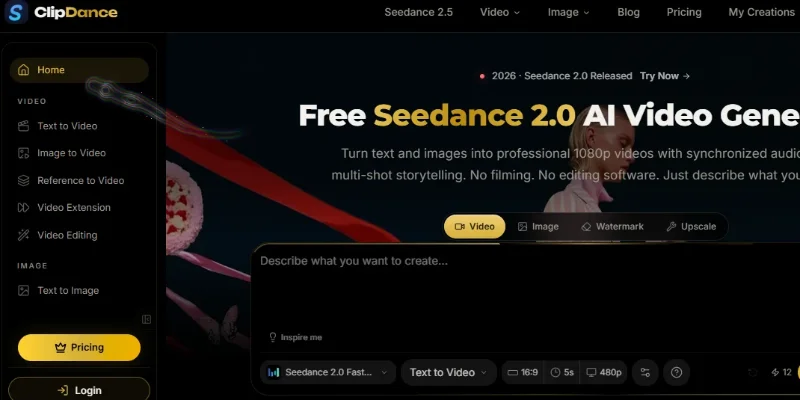
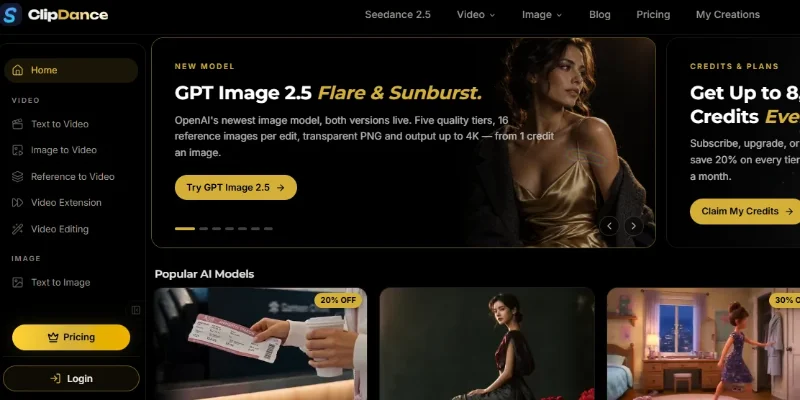
ClipDance AI is an AI-powered video creation platform that transforms text prompts, images, and reference media into cinematic videos with synchronized audio. It provides access to multiple AI models, including Seedance 2.0, Seedance 2.5, Kling, and Vidu, through a browser-based workspace. The platform is designed to help creators produce video content without traditional filming equipment or complex editing software.
What Is ClipDance AI?
ClipDance AI is an online creative platform for generating and editing videos with artificial intelligence. Users can describe a scene in natural language or upload images and reference materials to create animated footage, multi-shot sequences, and visual stories. Supported models can generate synchronized dialogue, music, and sound effects alongside video, reducing the need for separate audio production.
The platform offers text-to-video, image-to-video, reference-to-video, video extension, and video editing tools. It also supports AI-generated images, prompt assistance, and specialized workflows for product advertisements, social media content, character animation, and music videos. Depending on the model and subscription plan, users can access HD output, longer clips, advanced controls, and commercial-use licensing.
ClipDance AI is particularly useful for content creators, marketers, filmmakers, e-commerce businesses, and designers who want to develop video concepts or promotional content with less manual production work. It is an independent third-party service and is not affiliated with or operated by ByteDance, the developer of Seedance.
Verifiable Stats
-
Platform type: AI video and image generation
-
Primary capabilities: Text-to-video, image-to-video, reference-to-video, video editing, and video extension
-
AI models: Multiple models, including Seedance 2.0, Seedance 2.5, Kling, and Vidu
-
Audio generation: Synchronized dialogue, music, and sound effects on supported models
-
Video resolution: Up to 1080p on eligible plans; up to 4K on the advertised Business plan
-
Video duration: Varies by model and plan, with selected workflows supporting clips up to 30 seconds
-
Free access: 3 welcome credits for new accounts, according to the official pricing page
Screenshots & Demo

Key Features
Core capabilities and functionalities provided by Clipdance.
Context-Aware Code Completion & Synthesis
Delivers low-latency inline code completions, multi-token suggestions, and semantic completions customized to the repository context.
Multi-File Codebase Indexing & Exploration
Deeply scans project files, dependency trees, and symbol references to provide comprehensive cross-file edits and refactorings.
Automated Git & Terminal Workflow Automation
Executes shell commands, analyzes test runs, resolves syntax and runtime bugs, and crafts clean commit messages and pull requests.
Architectural Refactoring & Security Audit
Spots security vulnerabilities, dead code paths, and architectural smells, providing one-click semantic fixes and unit tests.
Pros & Cons
Key strengths and potential limitations of Clipdance.
What We Like
- Multiple AI Video Models: Offers access to models such as Seedance, Kling, and Vidu, giving users different options for video generation
- Flexible Video Creation: Supports text-to-video, image-to-video, reference-based generation, and other video workflows.
- Integrated Audio Generation: Supported models can generate synchronized dialogue, music, and sound effects alongside video.
- Creative Editing Tools: Features such as video extension and AI-assisted editing help users refine clips and experiment with different visual concepts.
- Suitable for Marketing and Social Media: Helps creators produce promotional videos, product showcases, cinematic clips, and short-form content without traditional filming equipment.
Where It Falls Short
- Limited Free Credits: The introductory free allowance may be insufficient for users who want to test multiple models or create several videos.
- Subscription Costs: Frequent generation and access to advanced models may require a paid plan, increasing costs for regular users.
- Variable Generation Quality: Results can differ depending on the prompt, reference materials, selected model, and generation settings.
- Limited Control Over Exact Details: Maintaining consistent characters, precise movements, text, and scene continuity can require repeated generations and prompt adjustments.
- Model and Plan Restrictions: Video duration, resolution, generation limits, and advanced features may vary by model and subscription tier.
Use Cases
Discover common workflows and scenarios where Clipdance excels.
Text-to-Video Creation
Turn written descriptions into video clips by specifying scenes, characters, actions, camera movements, and visual styles. This is useful for quickly exploring creative ideas.
Image-to-Video Animation
Animate still images, illustrations, and photographs to create dynamic visual content for digital campaigns, presentations, and social media.
Social Media Video Production
Create short-form videos for platforms such as Instagram Reels, TikTok, and YouTube Shorts without needing a traditional filming setup.
Product Advertisement Creation
Transform product images and marketing concepts into promotional videos that showcase products through cinematic visuals and motion.
AI Marketing Campaigns
Create visual assets for brand awareness, promotional campaigns, and online advertisements without requiring a complete traditional video production workflow.
Cinematic Scene Generation
Experiment with cinematic camera movements, lighting, environments, and visual styles to develop scenes for creative projects and concept presentations.
AI Music Videos
Generate visual sequences to accompany music, using supported video and audio workflows to create promotional clips and experimental music videos
Character Animation
Animate character images and generate scenes featuring fictional characters for storytelling, entertainment, and creative content.
Similar AI Tools







Latest from Our Blog
Tips, tutorials and insights about AI tools and how to use them effectively.

ChatGPT for Brand Voice: Can It Sound Like You?

ChatGPT for Marketing: The Complete 2026 Guide

Best AI Tools for Real Estate Agents in 2026: Listings, Leads and Follow-Up

Google Gemini vs ChatGPT: Which AI Assistant Should You Actually Use?
Reviews & Community Ratings
Average rating: 8.5 out of 5 (1 total reviews)
Rate Clipdance
Community Reviews (0)