

FreeMaker AI
By FreeMaker AI
AI-powered coding companion built for high-velocity software engineering.
Overview
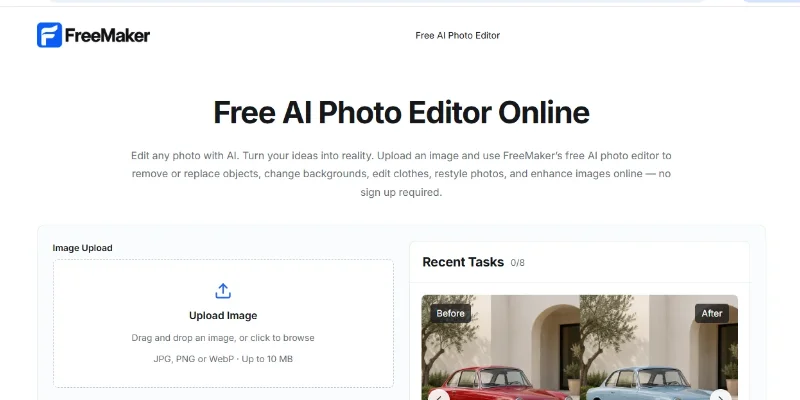
Summary: FreeMaker is a browser-based AI photo editor that lets users edit existing images using natural-language prompts. It can remove or replace objects, change backgrounds, modify clothing and colors, edit text and logos, restyle photos, and enhance image details. The website advertises free access without registration or added watermarks, making it useful for quick photo edits, product images, social media content, and creative projects.
What is FreeMaker?
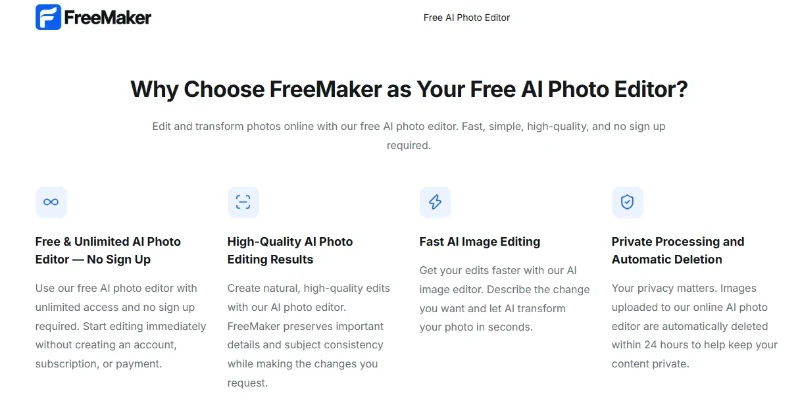
FreeMaker is an AI-powered image editing tool available at freemaker.net. Instead of relying on traditional editing controls such as layers, masks, or manual selections, users upload an image and describe the changes they want in a text prompt. The tool is designed to make common edits easier, including removing unwanted objects, replacing backgrounds, changing visual styles, adjusting clothing, modifying text and graphics, and improving image quality. It supports JPG, PNG, and WebP uploads up to 10 MB, according to its website. FreeMaker also states that uploaded images are automatically deleted within 24 hours. Its browser-based workflow is intended for individuals, content creators, online sellers, and marketing teams who want to produce or refine visuals without advanced photo-editing skills.
Verifiable Stats:
-
Website: FreeMaker is available at freemaker.net.
-
Primary function: AI-powered photo editing through text prompts.
-
Supported image formats: JPG, PNG, and WebP.
-
Maximum upload size: 10 MB per image, according to the website's upload interface.
-
Object editing: Supports removing, adding, or replacing image objects and other elements.
Screenshots & Demo
Key Features
Core capabilities and functionalities provided by FreeMaker AI.
Context-Aware Code Completion & Synthesis
Delivers low-latency inline code completions, multi-token suggestions, and semantic completions customized to the repository context.
Multi-File Codebase Indexing & Exploration
Deeply scans project files, dependency trees, and symbol references to provide comprehensive cross-file edits and refactorings.
Automated Git & Terminal Workflow Automation
Executes shell commands, analyzes test runs, resolves syntax and runtime bugs, and crafts clean commit messages and pull requests.
Architectural Refactoring & Security Audit
Spots security vulnerabilities, dead code paths, and architectural smells, providing one-click semantic fixes and unit tests.
Pros & Cons
Key strengths and potential limitations of FreeMaker AI.
What We Like
- Easy Prompt-Based Editing: Edit images by describing the desired changes in natural language instead of using complex editing tools.
- Multiple Editing Capabilities: Remove unwanted objects, replace backgrounds, modify clothing, and adjust visual elements within images.
- Supports Common Image Formats: Accepts JPG, PNG, and WebP uploads, making it convenient for everyday image-editing tasks.
- Creative Style Transformations: Experiment with different visual styles, including cinematic, anime, cartoon, vintage, and photorealistic looks.
- Free Browser-Based Access: The website advertises free editing without registration or added watermarks, making it accessible for quick creative projects.
Where It Falls Short
- Results Depend on Prompts: Vague or overly complex instructions may produce edits that do not match the intended result.
- AI Editing Can Introduce Errors: Fine details, faces, text, logos, and object boundaries may not always remain accurate.
- Limited Control Compared With Professional Editors: Users who need precise layer-based editing or detailed manual adjustments may find the workflow restrictive.
- Upload Size Limit: The website lists a maximum image upload size of 10 MB, which may limit some high-resolution files.
- Privacy Requires Consideration: Although the website states that uploaded images are deleted within 24 hours, users should review its privacy policy before uploading confidential or sensitive images.
Use Cases
Discover common workflows and scenarios where FreeMaker AI excels.
AI Photo Editing
Edit existing photos by describing the desired changes in natural language. FreeMaker helps simplify everyday editing tasks without requiring advanced photo-editing skills.
Background Replacement
Replace plain or distracting backgrounds with new scenes to create cleaner, more professional-looking images for personal or business use.
Background Replacement
Replace plain or distracting backgrounds with new scenes to create cleaner, more professional-looking images for personal or business use.
Unwanted Object Removal
Remove unwanted objects, visual distractions, or background elements from photos to create a more focused composition.
Product Image Enhancement
Improve product photos by refining their appearance, replacing backgrounds, and preparing visuals for online stores, catalogues, and promotional materials.
Social Media Content Creation
Create engaging visuals for social media posts, advertisements, and profile content by modifying image elements and experimenting with different styles.
Creative Image Restyling
Transform photos into different visual styles, such as cinematic, anime, cartoon, vintage, or photorealistic looks, for creative projects and digital content.
Portrait and Fashion Editing
Experiment with clothing changes, appearance adjustments, and scene modifications to develop alternative looks for portraits and fashion concepts.
Similar AI Tools






Latest from Our Blog
Tips, tutorials and insights about AI tools and how to use them effectively.

ChatGPT for Brand Voice: Can It Sound Like You?

ChatGPT for Marketing: The Complete 2026 Guide

Best AI Tools for Real Estate Agents in 2026: Listings, Leads and Follow-Up

Google Gemini vs ChatGPT: Which AI Assistant Should You Actually Use?
Reviews & Community Ratings
Average rating: 5.0 out of 5 (1 total reviews)
Rate FreeMaker AI
Community Reviews (0)