

Humanize Max
By Humanize Max
Intelligent developer copilot automating code completion, refactoring, and debugging.
Overview
Summary: HumanizeMax AI is a free, browser-based AI text humanizer that rewrites AI-generated content into more natural, readable language while aiming to preserve the original meaning. It offers four writing styles, adjustable text length, file uploads, keyword and terminology protection, sentence-level rephrasing, and unlimited reruns. The platform requires no account or subscription, making it accessible to writers, bloggers, students, marketers, SEO professionals, and non-native English speakers.
What is HumanizeMax AI?
HumanizeMax AI, also known as Humanize Max, is an AI-powered writing tool designed to improve the natural flow, clarity, and tone of existing text. Users can paste AI-generated content or upload a supported file, select a writing style and desired length, and generate a revised version within seconds.
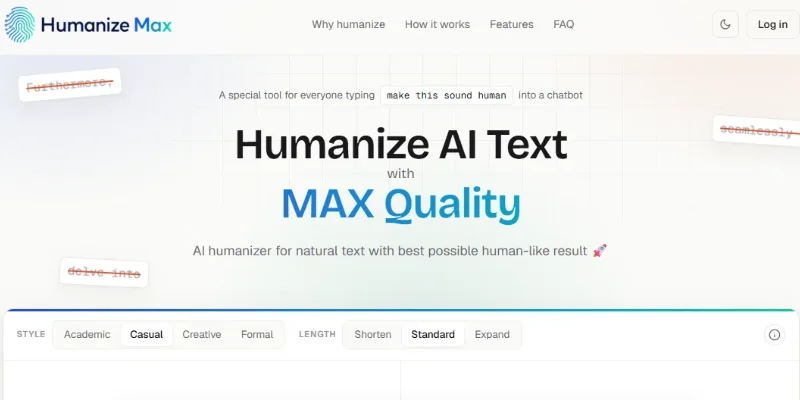
The platform supports Academic, Casual, Creative, and Formal styles to help users adapt their writing to different audiences and purposes. Its length controls allow users to retain approximately the same word count, shorten content, or expand it. A term-locking feature helps preserve specific names, brands, phrases, and SEO keywords, while single-line rephrasing allows users to revise an individual sentence without rewriting the entire document.
HumanizeMax is intended primarily for refining existing drafts rather than generating complete articles from scratch. It can help improve blog posts, marketing copy, emails, reports, academic drafts, and other written material. However, users should review the output for factual accuracy, meaning, tone, and originality. Although the tool aims to make AI-generated text sound more natural, it cannot guarantee a particular AI-detection result or replace appropriate human review.
Verifiable Stats:
-
Four writing styles: HumanizeMax offers Academic, Casual, Creative, and Formal modes for adapting text to different writing needs.
-
Three output-length options: Users can maintain approximately the original length, shorten the text, or expand it.
-
File upload support: Users can submit supported documents instead of manually pasting all their text into the editor.
-
Term-locking functionality: Selected names, brands, keywords, and phrases can be preserved while the surrounding text is rewritten.
-
Sentence-level editing: The single-line rephrasing feature lets users revise a specific sentence without regenerating the entire passage.
-
Unlimited reruns: The official website advertises unlimited rewriting attempts, allowing users to generate alternative versions of their content.
-
No word-count cap advertised: HumanizeMax states that users can process unlimited words, although practical technical limitations may still apply.
-
No registration required: Users can access the humanizer without creating an account or signing in
-
Free access with no paywall: The website advertises all its core humanization features as free, without a paid subscription requirement.
-
Multiple AI-writing workflows: The tool is intended for refining content produced by AI assistants such as ChatGPT, Claude, Gemini, and DeepSeek, as well as other existing drafts.
Screenshots & Demo
Key Features
Core capabilities and functionalities provided by Humanize Max.
Context-Aware Code Completion & Synthesis
Delivers low-latency inline code completions, multi-token suggestions, and semantic completions customized to the repository context.
Multi-File Codebase Indexing & Exploration
Deeply scans project files, dependency trees, and symbol references to provide comprehensive cross-file edits and refactorings.
Automated Git & Terminal Workflow Automation
Executes shell commands, analyzes test runs, resolves syntax and runtime bugs, and crafts clean commit messages and pull requests.
Architectural Refactoring & Security Audit
Spots security vulnerabilities, dead code paths, and architectural smells, providing one-click semantic fixes and unit tests.
Pros & Cons
Key strengths and potential limitations of Humanize Max.
What We Like
- Completely Free to Use: HumanizeMax advertises free access to its core features without a subscription, account registration, or paywall.
- Four Writing Styles: Academic, Casual, Creative, and Formal modes help users adapt rewritten text to different audiences and purposes.
- Flexible Text-Length Controls: Users can keep the approximate original length, shorten content, or expand it according to their needs.
- Keyword and Term Protection: The term-locking feature helps preserve important names, brand references, and SEO keywords while rewriting surrounding text.
- Convenient Sentence-Level Editing: Users can rephrase an individual sentence or rerun the text to explore alternative versions without paying for additional attempts.
Where It Falls Short
- Limited Editing Scope: The tool focuses on humanizing and rewriting existing text rather than providing a complete suite of grammar checking, research, and content-generation tools.
- Output Requires Review: Rewriting may unintentionally change meaning, remove important details, or introduce awkward phrasing, so users should proofread the result.
- No Guaranteed AI-Detector Results: HumanizeMax cannot guarantee how third-party AI detectors will classify rewritten text.
- Potential Per-Request Limits: Although the website advertises unlimited usage, the editor may impose a limit on how much text can be processed in one attempt, requiring longer documents to be split.
- Browser-Based Workflow: The platform is designed for use through a web browser, and a dedicated desktop application or public API was not confirmed in the sources reviewed.
Use Cases
Discover common workflows and scenarios where Humanize Max excels.
AI-Generated Content Rewriting
Rewrite AI-generated drafts to improve sentence flow, vary phrasing, and make the content more natural and readable while retaining the intended message.
Blog Post Editing
Refine existing blog posts by improving sentence structure, reducing repetitive wording, and adjusting the tone to suit the target audience.
SEO Content Optimization
Preserve important keywords and brand terms while rewriting website content, product descriptions, and articles to improve readability without unnecessarily changing key phrases.
Academic Draft Refinement
Use the Academic writing style to refine essays, reports, and study notes. Review the result carefully and follow institutional rules regarding AI-assisted writing.
Marketing Copy Improvement
Rewrite promotional content, campaign messages, and advertising copy to create clearer, more engaging language suited to a specific audience.
Professional Email Rewriting
Improve the clarity and tone of business emails, client communications, and workplace messages using the Formal writing style.
Social Media Content Editing
Refine captions, short posts, and promotional messages to make them more conversational, engaging, or appropriate for a particular platform.
Sentence-Level Paraphrasing
Rewrite individual sentences that sound repetitive, awkward, or overly complex without having to regenerate the entire document.
Similar AI Tools






Latest from Our Blog
Tips, tutorials and insights about AI tools and how to use them effectively.

ChatGPT for Brand Voice: Can It Sound Like You?

ChatGPT for Marketing: The Complete 2026 Guide

Best AI Tools for Real Estate Agents in 2026: Listings, Leads and Follow-Up

Google Gemini vs ChatGPT: Which AI Assistant Should You Actually Use?
Reviews & Community Ratings
Average rating: 8.5 out of 5 (1 total reviews)
Rate Humanize Max
Community Reviews (0)