Jace.ai
By Jace.ai
Next-generation AI code assistant with deep multi-file repository understanding.
Overview
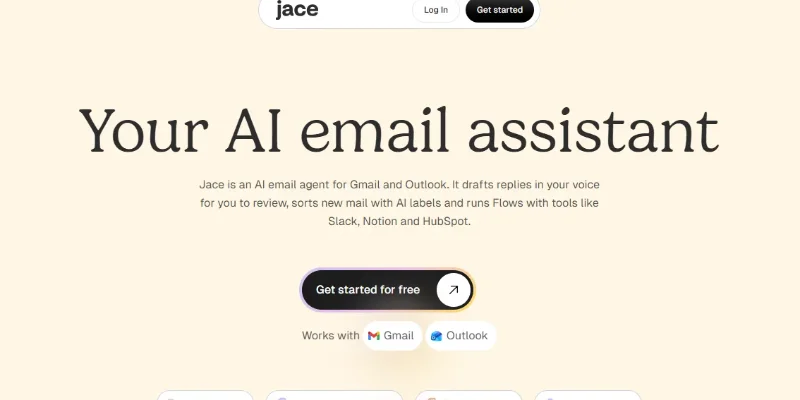
Summary: Jace AI is an AI-powered email assistant and automation platform that helps professionals manage their inboxes, draft personalized email replies, organize incoming messages, and automate repetitive business tasks. It works with Gmail, Google Workspace, Outlook, and Microsoft 365, using email history, attachments, calendar information, and connected business tools to prepare context-aware drafts in the user's writing style. Jace also offers AI-powered email labels, smart rules, automated workflows called Flows, and integrations with tools such as Slack, Notion, HubSpot, Google Drive, and Linear. It is designed for professionals, business owners, consultants, sales teams, and organizations looking to improve email productivity.
What Is Jace AI?
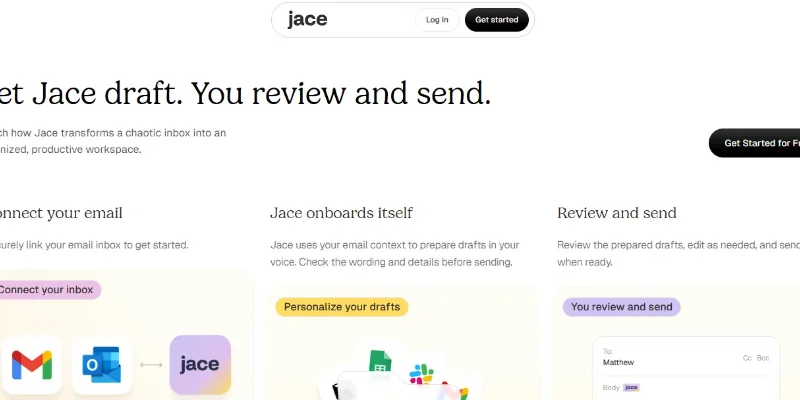
Jace AI is an intelligent email agent that helps users handle everyday email communication and business workflows more efficiently. Rather than simply generating text, it connects with an existing email account and uses conversation history and relevant business context to prepare replies, organize messages, and perform tasks through connected applications.
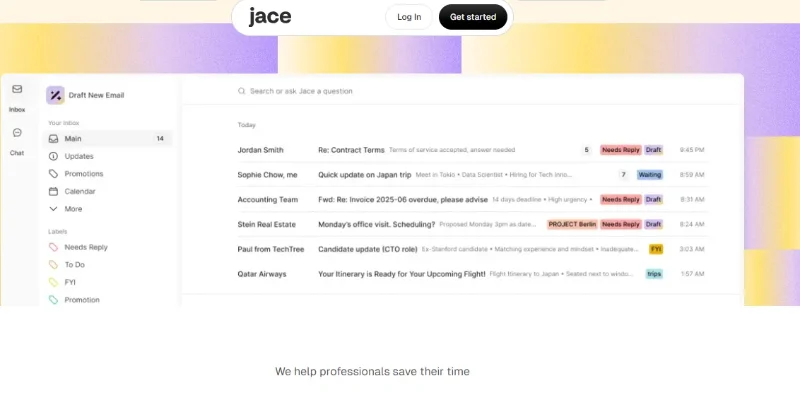
Its AI Email Drafts feature prepares personalized responses that match the user's writing style by analyzing previous conversations and relevant attachments. Users can review, edit, and send these drafts from their regular Gmail or Outlook inbox. Its AI Labels feature automatically categorizes incoming messages based on their purpose and priority, while Smart Rules lets users create custom instructions for recurring email situations, such as adding recipients, applying templates, or triggering calendar actions.
Jace also includes Flows, which allow users to describe email-based automations in natural language. These workflows can draft responses, create calendar events, search for information, and interact with connected business tools. Its AI Chief of Staff feature allows users to ask questions about information in their emails and connected services, retrieve relevant data, and initiate actions.
Jace is particularly useful for professionals who manage high volumes of email, consultants handling multiple client inboxes, business owners, sales teams, and organizations that want to reduce repetitive administrative work.
Verifiable Stats
-
Product Name: Jace AI
-
Platform Type: AI Email Assistant, AI Email Agent, and Workflow Automation Platform.
-
Primary Function: Email drafting, inbox organization, communication management, and business workflow automation.
-
Supported Email Services: Gmail, Google Workspace, Outlook.com, and Microsoft 365.
-
Key Features: AI email drafts, smart rules, AI labels, email search, follow-up drafts, Flows, and AI Chief of Staff.
-
Integrations: Slack, Notion, HubSpot, Linear, Google Drive, OneDrive, and MCP servers.
-
Connected Accounts: Up to 2 inboxes on Plus and up to 8 inboxes on Pro.
-
Free Trial: 7-day free trial.
-
Pricing: Plus starts at $25/month or $20/month billed annually; Pro starts at $50/month or $40/month billed annually. Both plans include monthly credits.
-
Security: SOC 2 Type 1 examination and encryption of email data in transit and at rest, according to the company.
-
Mobile Access: No dedicated native mobile app; drafts and labels appear in the user's Gmail or Outlook mobile application.
-
Best For: Professionals, consultants, entrepreneurs, sales teams, and businesses managing high email volumes.
Screenshots & Demo
Key Features
Core capabilities and functionalities provided by Jace.ai.
Context-Aware Code Completion & Synthesis
Delivers low-latency inline code completions, multi-token suggestions, and semantic completions customized to the repository context.
Multi-File Codebase Indexing & Exploration
Deeply scans project files, dependency trees, and symbol references to provide comprehensive cross-file edits and refactorings.
Automated Git & Terminal Workflow Automation
Executes shell commands, analyzes test runs, resolves syntax and runtime bugs, and crafts clean commit messages and pull requests.
Architectural Refactoring & Security Audit
Spots security vulnerabilities, dead code paths, and architectural smells, providing one-click semantic fixes and unit tests.
Pros & Cons
Key strengths and potential limitations of Jace.ai.
What We Like
- Personalized Email Drafting: Jace analyzes previous email conversations to generate replies that reflect the user's writing style, tone, and communication preferences. This helps users prepare more natural and consistent responses.
- Supports Multiple Email Accounts: Jace works with Gmail, Google Workspace, Outlook, and Microsoft 365. Its support for multiple inboxes makes it useful for professionals managing personal and business email accounts.
- Automated Inbox Organization: AI Labels can automatically categorize incoming messages based on their content and purpose. This helps users identify important emails and keep their inboxes organized.
- Custom Email Automation Rules: Smart Rules allow users to define instructions for recurring email situations, such as preparing responses, applying templates, and handling routine communication tasks.
- Natural-Language Workflow Automation: Jace Flows lets users describe automation tasks in everyday language. This makes it easier to create workflows without manually configuring every individual step.
Where It Falls Short
- Subscription Cost Can Be High: Jace's paid plans may be expensive for individual users or small businesses that only need basic email drafting and inbox organization.
- Requires Access to Email Accounts: To provide personalized assistance, Jace needs permission to connect to users' email accounts. Some users may be uncomfortable granting an AI tool access to sensitive business or personal correspondence.
- AI Drafts Need Human Review: Generated replies may occasionally misunderstand context, miss important details, or use an unsuitable tone. Users should review messages before sending them.
- Limited Value for Low-Volume Email Users: People who receive only a few emails each day may not benefit enough from its advanced automation features to justify a paid subscription.
- Dependence on Connected Services: Several workflows rely on integrations with email providers and third-party applications. Changes in API permissions, connectivity, or service availability can affect automation.
Use Cases
Discover common workflows and scenarios where Jace.ai excels.
Automated Email Reply Drafting
Professionals can use Jace AI to generate email replies based on previous conversations, attachments, and communication context. This reduces the time spent writing repetitive responses while allowing users to review drafts before sending.
Personalized Business Communication
Jace can analyze a user's previous email conversations and writing patterns to prepare responses that match their preferred tone and style. This helps maintain consistent communication with clients, colleagues, and business partners.
Inbox Organization and Management
Users can use Jace AI Labels to automatically categorize incoming messages based on their purpose and priority. This makes it easier to separate important emails, informational updates, pending tasks, and conversations requiring replies.
Automated Email Follow-Ups
Sales professionals and business owners can use Jace to identify conversations awaiting responses and prepare follow-up drafts. This helps prevent important business discussions from being overlooked.
Customer Enquiry Management
Customer-facing teams can use Jace to prepare responses to common customer enquiries, organize incoming requests, and manage ongoing email conversations. This helps reduce repetitive communication tasks.
Sales Prospect Communication
Sales representatives can use Jace to draft personalized emails for potential customers, respond to prospect enquiries, and manage conversations throughout the sales process.
Meeting Scheduling Through Email
Professionals can use Jace's automation workflows to identify meeting requests in emails and help create calendar events. This reduces the manual effort involved in coordinating schedules and appointments.
Email-Based Workflow Automation
Users can create Jace Flows using natural-language instructions to automate repetitive email-related activities. For example, a workflow can identify a particular type of incoming message and prepare a suitable draft or trigger another connected action.
Similar AI Tools

Writesonic
AI Writing Assistant & SEO Content Generator for Growth Teams

Grammarly
AI-Powered Writing Assistant & Real-Time Editing Tool

Humanizer
Make AI text sound natural and human

Sudowrite
AI Writing Partner Built Specifically for Fiction and Creative Writers

Copy-AI
GTM AI Platform for Marketing & Sales Automation

Frase
AI-Powered SEO Content Research, Writing & Optimization Platform

Hummanizer
Transform AI-generated text into natural, human-like writing

Worldtune
AI Writing Assistant & Smart Paraphrasing Tool
Latest from Our Blog
Tips, tutorials and insights about AI tools and how to use them effectively.
ChatGPT for Brand Voice: Can It Sound Like You?

ChatGPT for Marketing: The Complete 2026 Guide

Best AI Tools for Real Estate Agents in 2026: Listings, Leads and Follow-Up