

MenuForma
By MenuForma
Context-aware software development platform for rapid engineering workflows.
Overview
Summary
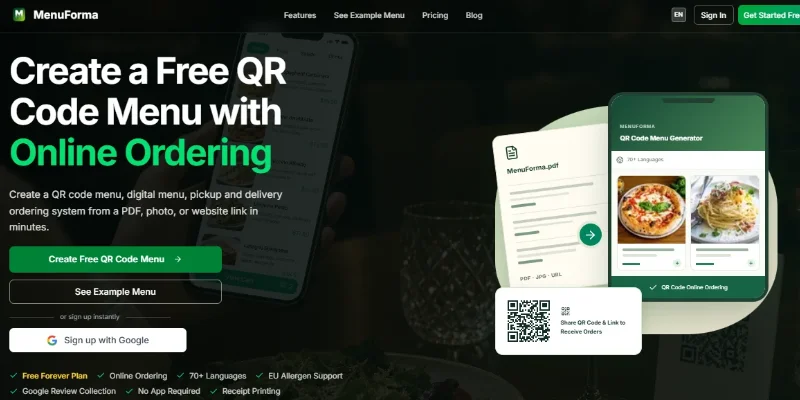
MenuForma is an AI-powered digital menu and restaurant ordering platform that helps restaurants, cafés, hotels, and other food businesses turn existing menus into mobile-friendly QR code menus. It supports menu imports from PDFs, photos, or website links, online ordering, multilingual menu translation, allergen labels, and Google review collection. Its Free Forever plan provides a way to get started without a credit card, while paid plans add capabilities such as multiple languages, additional restaurant locations, online payments, and analytics.
What is MenuForma?
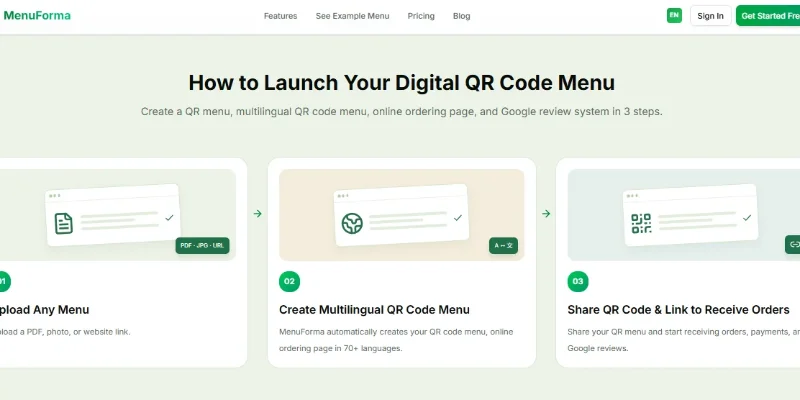
MenuForma is a browser-based restaurant technology platform designed to simplify digital menu management and customer ordering. Instead of creating a menu from scratch, restaurant owners can upload an existing PDF, photograph, or website menu and use AI-assisted extraction to turn it into an editable digital menu. They can review and update dishes, prices, descriptions, and images before publishing a QR code that customers scan with their phones.
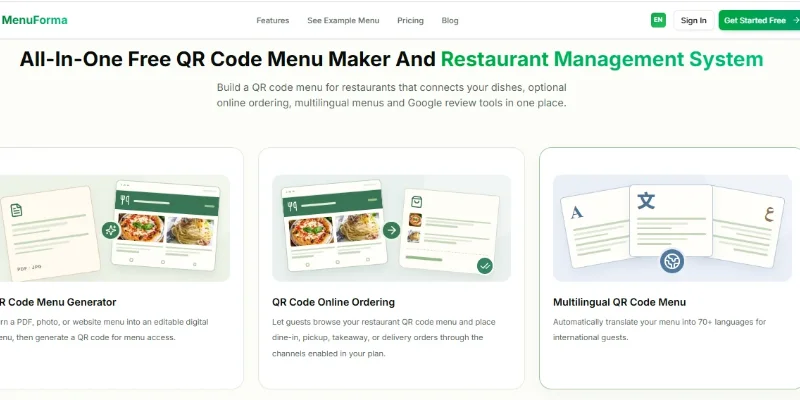
Beyond displaying menus, MenuForma supports ordering workflows for dine-in, pickup, takeaway, delivery, and hotel room service, depending on the selected configuration and plan. Restaurants can use individual QR codes for tables or rooms, a shared code for counter service, or display-only menus for browsing without online ordering. The platform also advertises translation into more than 70 languages, EU allergen labels, order notifications, analytics, and Google review collection. Online payments are supported through a configured Stripe integration on eligible plans.
Verifiable Stats
-
Two advertised pricing tiers: MenuForma lists a Free Forever plan at $0 per month and a Regular plan advertised at $9.90 per month, with annual billing and a stated 20% saving option. Check the official pricing page for current terms.
-
70+ supported languages: The platform advertises automatic menu translation into more than 70 languages to help international customers understand dishes and descriptions.
-
Three menu-import methods: Users can start with a PDF, a photo, or a website link, then review and edit the extracted menu information.
-
Six advertised QR menu modes: MenuForma lists per-table, unified, hotel or room-service, tablet, self-select, and display-only menu configurations.
-
Four main ordering workflows: Depending on the configuration, the platform supports dine-in, pickup, takeaway, and delivery ordering.
-
14 EU allergen categories: The platform supports labeling dishes with the 14 allergen categories used in EU food-information requirements. Restaurants remain responsible for verifying ingredients and allergen information.
-
One restaurant on the Free Forever plan: The advertised free plan supports one restaurant, one primary language, one menu display template, and visible MenuForma branding.
-
Online payments in 42 countries: MenuForma lists online payment functionality in 42 countries on its Regular plan, subject to Stripe availability and account configuration. Payment processing fees and the platform's stated transaction fee may apply.
-
Multiple-location management: The platform advertises the ability to manage multiple restaurants, with this capability listed among the paid-plan features.
-
No customer app required: Customers can scan a QR code or open a shared link in a compatible web browser to view a menu and place orders where ordering is enabled.
Screenshots & Demo
Key Features
Core capabilities and functionalities provided by MenuForma.
Context-Aware Code Completion & Synthesis
Delivers low-latency inline code completions, multi-token suggestions, and semantic completions customized to the repository context.
Multi-File Codebase Indexing & Exploration
Deeply scans project files, dependency trees, and symbol references to provide comprehensive cross-file edits and refactorings.
Automated Git & Terminal Workflow Automation
Executes shell commands, analyzes test runs, resolves syntax and runtime bugs, and crafts clean commit messages and pull requests.
Architectural Refactoring & Security Audit
Spots security vulnerabilities, dead code paths, and architectural smells, providing one-click semantic fixes and unit tests.
Native IDE & CLI Integration
Seamlessly operates within developer terminals and mainstream code editors without interrupting daily engineering flow.
Pros & Cons
Key strengths and potential limitations of MenuForma.
What We Like
- AI-Powered Menu Creation: Convert existing menus from PDFs, photos, or website links into editable digital menus, reducing manual data entry.
- QR Code Menu Access: Let customers scan a QR code to browse menus on their smartphones without installing a dedicated app.
- Multilingual Menu Translation: Translate menus into more than 70 languages to make restaurant information more accessible to international customers.
- Flexible Ordering Options: Support dine-in, takeaway, pickup, delivery, and room-service workflows, depending on the selected configuration.
- Free Plan Available: Start with the Free Forever plan to test digital menus before upgrading for additional languages, locations, and payment features.
Where It Falls Short
- Free-Plan Restrictions: The free plan limits the number of restaurants, languages, and menu templates and includes MenuForma branding.
- AI Import Requires Review: Extracted dish names, descriptions, prices, and other details may contain errors, so menus should be checked before publication.
- Paid Plan Needed for Advanced Features: Multiple locations, additional languages, and certain payment features may require a paid subscription.
- Payment Fees May Apply: Online payments require supported payment-provider configuration and may involve processing fees and additional platform charges.
- Internet and QR-Code Dependence: Customers generally need a compatible smartphone and internet access to use online menus and ordering. Restaurants should retain an alternative ordering method for customers who cannot use QR codes.
Use Cases
Discover common workflows and scenarios where MenuForma excels.
QR Code Menu Creation
Convert traditional paper menus into digital menus that customers can open by scanning a QR code with their smartphones
AI-Powered Menu Import
Import existing menus from PDFs, photographs, or website links and use AI-assisted extraction to reduce manual menu entry.
Restaurant Online Ordering
Allow customers to browse dishes and place orders online for supported dine-in, takeaway, pickup, or delivery workflows.
Table-Side Ordering
Assign individual QR codes to restaurant tables so customers can access the menu and place orders from their seats, where the configured workflow supports it.
Takeaway and Pickup Orders
Provide customers with a digital menu for selecting food and arranging pickup without relying entirely on phone orders.
Food Delivery Ordering
Present menu items online and accept delivery orders through supported ordering configurations, helping restaurants manage digital sales channels.
Hotel Room-Service Menus
Create QR-code menus for hotel rooms so guests can browse available food and beverage options using their own devices.
Multilingual Menu Publishing
Translate menu content into supported languages to help international tourists and multilingual customers understand dish names and descriptions.
Similar AI Tools
Notion AI

Microsoft Copilot

YouChat

Firefiles-AI

Phind

Beautiful-AI
EinfachAI

SBTI Test
Latest from Our Blog
Tips, tutorials and insights about AI tools and how to use them effectively.

ChatGPT for Brand Voice: Can It Sound Like You?

ChatGPT for Marketing: The Complete 2026 Guide

Best AI Tools for Real Estate Agents in 2026: Listings, Leads and Follow-Up

Google Gemini vs ChatGPT: Which AI Assistant Should You Actually Use?
Reviews & Community Ratings
Average rating: 8.5 out of 5 (1 total reviews)
Rate MenuForma
Community Reviews (0)