Nextbrowser
By Nextbrowser
Next-generation AI code assistant with deep multi-file repository understanding.
Overview
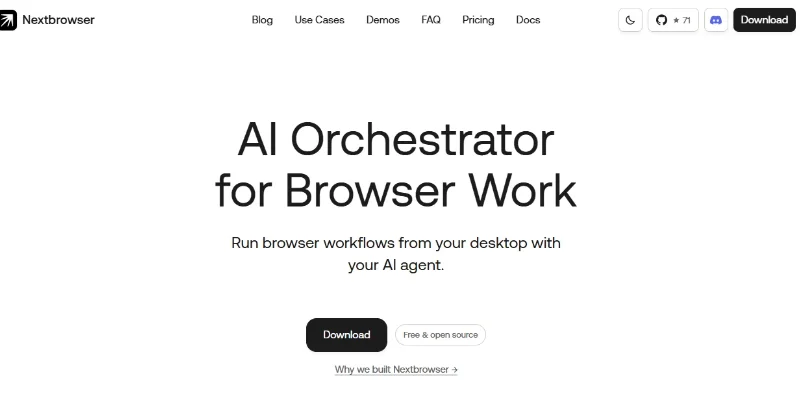
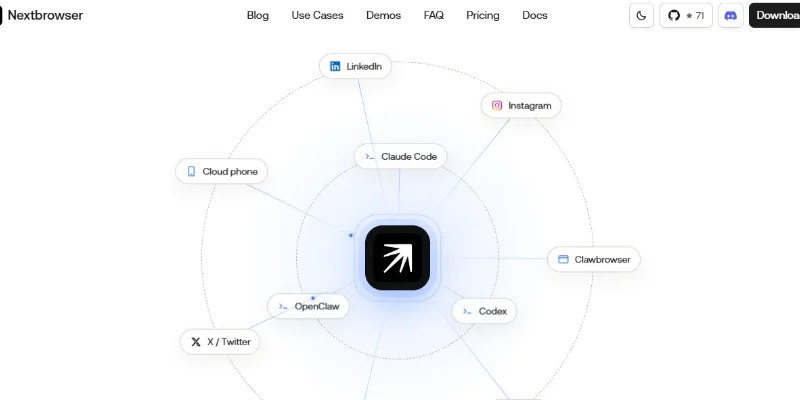
Summary: Nextbrowser is an open-source AI browser automation and orchestration platform that helps users automate repetitive web-based tasks through AI agents. It provides a desktop workspace where users can connect agents such as Claude Code, Codex, and OpenClaw to managed browser sessions, isolated profiles, proxy configurations, and reusable workflows. Nextbrowser supports web research, data extraction, competitor monitoring, social media operations, price tracking, and browser-based testing.
What is Nextbrowser?
Nextbrowser is designed to make AI-powered browser automation more manageable, observable, and reusable. Rather than functioning as a conventional web browser or providing its own standalone AI model, it acts as an orchestration layer that connects AI agents with browser sessions and the tools needed to complete web-based tasks.
Users can connect an installed AI agent, select a browser profile, configure the required session and proxy settings, and provide instructions in natural language. The connected agent can then perform activities such as visiting websites, researching competitors, collecting information, extracting structured data, and managing repetitive browser workflows.
The platform also includes reusable skills and custom scripts, scheduled runs, browser session management, live activity monitoring, screenshots, and diagnostic tools. Users can supervise ongoing tasks, pause or edit runs, and review results. Its desktop application is available for macOS and Windows, with additional builds available through GitHub.
Verifiable Stats:
-
Developer: Nextbrowser Team.
-
Platform Type: AI Browser Automation and Agent Orchestration Platform.
-
Availability: Free and open-source desktop application.
-
License: GNU Affero General Public License v3.0 (AGPL-3.0-only).
-
Supported Operating Systems: macOS, Windows, and Linux builds.
-
Supported AI Agents: Claude Code, Codex, OpenClaw, and other supported local agents.
-
Browser Management: Isolated browser profiles, sessions, and identity configurations.
-
Automation Features: Web research, scraping, data extraction, scheduled workflows, and browser-based operations.
-
Advanced Features: Proxy configuration, fingerprint management, reusable skills, custom scripts, Live View, and session diagnostics.
-
Scheduling: Supports recurring browser tasks while the desktop application remains open.
-
Agent Requirement: Users must install and authenticate their selected AI agent locally.
Screenshots & Demo
Key Features
Core capabilities and functionalities provided by Nextbrowser.
Context-Aware Code Completion & Synthesis
Delivers low-latency inline code completions, multi-token suggestions, and semantic completions customized to the repository context.
Multi-File Codebase Indexing & Exploration
Deeply scans project files, dependency trees, and symbol references to provide comprehensive cross-file edits and refactorings.
Automated Git & Terminal Workflow Automation
Executes shell commands, analyzes test runs, resolves syntax and runtime bugs, and crafts clean commit messages and pull requests.
Architectural Refactoring & Security Audit
Spots security vulnerabilities, dead code paths, and architectural smells, providing one-click semantic fixes and unit tests.
Pros & Cons
Key strengths and potential limitations of Nextbrowser.
What We Like
- Open-Source and Free Access: Nextbrowser is available as an open-source desktop application under the AGPL-3.0 license. This allows developers to inspect its code, customize workflows, and explore its capabilities without purchasing a standard software subscription.
- Multiple AI Agent Integrations: It supports AI agents such as Claude Code, Codex, and OpenClaw, giving users flexibility to work with different agent ecosystems rather than relying on a single AI model.
- Automated Browser Workflows: Users can automate repetitive browser activities such as web research, information collection, data extraction, and website monitoring, reducing manual browsing effort.
- Isolated Browser Profiles: Its browser profile management helps users maintain separate sessions and browsing environments for different projects or accounts.
- Reusable Skills and Custom Scripts: Developers can create reusable browser automation skills and scripts, making it easier to repeat workflows without rebuilding instructions every time.
Where It Falls Short
- Requires External AI Agents: Nextbrowser primarily acts as a browser orchestration layer rather than a standalone AI assistant. Users need to install and configure a compatible external agent to perform AI-powered tasks.
- Technical Setup Can Be Challenging: Connecting agents, configuring browser profiles, managing proxies, and setting up custom workflows may be difficult for beginners without technical experience.
- Limited Beginner-Friendly Experience: Users looking for a simple, ready-to-use automation tool may find its agent configuration and workflow management features overwhelming.
- Depends on Local System Availability: Scheduled workflows generally require the desktop application and relevant local processes to remain available. This may limit unattended automation compared with fully cloud-hosted services.
- External Agent Costs May Apply: Although Nextbrowser itself is free, users may need paid subscriptions, API access, or usage credits for the AI agents they connect.
Use Cases
Discover common workflows and scenarios where Nextbrowser excels.
Automated Web Research
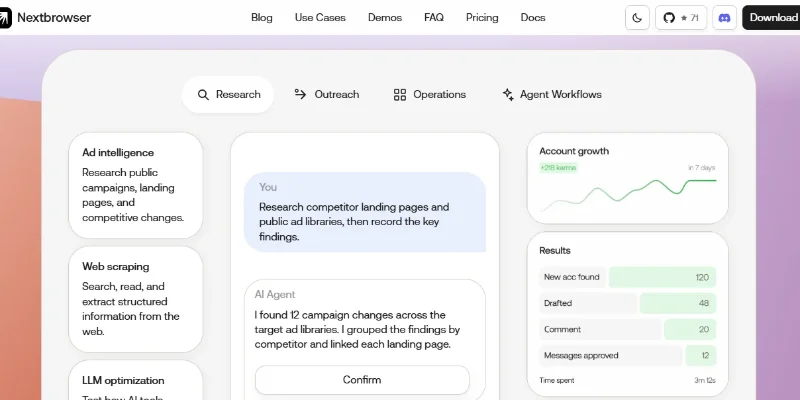
Nextbrowser can help researchers automate information gathering across multiple websites. Users can instruct a connected AI agent to visit relevant pages, collect specific details, summarize findings, and organize the results into a structured format.
Web Scraping and Data Extraction
Businesses and research teams can use Nextbrowser to extract publicly accessible information from websites. An AI agent can navigate pages, collect product details, company information, reviews, or other requested fields, and organize the extracted data for further analysis.
Competitor Website Analysis
Marketing teams can use Nextbrowser to examine competitor websites, landing pages, product offerings, pricing information, and promotional messages. Reusable workflows can help repeat the same research process and compare changes over time.
Social Media Monitoring
Users can connect an AI agent to browser sessions to research public discussions, monitor relevant conversations, identify trending topics, and prepare responses for human review. This can help marketing teams understand audience interests and online brand discussions.
E-commerce Product Research
Online sellers can automate product research across e-commerce websites. An agent can inspect product pages, compare specifications, identify sellers, and collect product information to support purchasing and merchandising decisions.
Price Comparison and Monitoring
Nextbrowser can help track product prices across different online stores. Users can configure workflows to collect prices, seller details, product variants, and availability, then compare results with previous runs.
Inventory and Stock Monitoring
E-commerce businesses can use recurring browser workflows to check whether products are available, out of stock, or listed with changed variants. This helps operations teams keep track of inventory information displayed on online storefronts.
Lead Generation and Business Research
Sales teams and agencies can use Nextbrowser to research potential customers, identify relevant businesses, and collect publicly available contact information. For example, an agent can research local businesses and prepare a structured lead list for sales teams.
Similar AI Tools
Do Browser
Intelligent developer copilot automating code completion, refactoring, and debugging.

ChatGPT
Research, Write, Code, Analyze, and Create with OpenAI’s Multimodal AI Assistant.

Claude
Write, Code, Analyze, Research, and Automate Complex Tasks with Claude AI.

Grok -AI
Get Real-Time Answers, Research the Web, Code, and Create with Grok AI.

Google - Gemini
Research, Write, Code, and Create with Google’s Multimodal AI Assistant.
Wordware AI
Next-generation AI code assistant with deep multi-file repository understanding.

ChatGOT
Your All-in-One AI Chatbot Assistant
Zapier Agents
Next-generation AI code assistant with deep multi-file repository understanding.
Latest from Our Blog
Tips, tutorials and insights about AI tools and how to use them effectively.
ChatGPT for Brand Voice: Can It Sound Like You?

ChatGPT for Marketing: The Complete 2026 Guide

Best AI Tools for Real Estate Agents in 2026: Listings, Leads and Follow-Up