

Photolaria
By Photolaria
Intelligent developer copilot automating code completion, refactoring, and debugging.
Overview
Summary: Photolaria is an AI-powered photo editing, image generation, and image upscaling platform that works directly in a web browser. It allows users to create images from text prompts, edit existing photos using natural-language instructions, remove backgrounds and unwanted objects, enhance image quality, restore old photographs, and upscale images to higher resolutions. The platform brings multiple AI image models—including Google’s Nano Banana family, OpenAI’s GPT Image models, ByteDance’s Seedream models, and Black Forest Labs’ Flux—into one workspace, letting users choose a model for each task. Photolaria offers a free starting allowance through bonus credits, alongside paid monthly plans for higher usage.
What Is Photolaria?
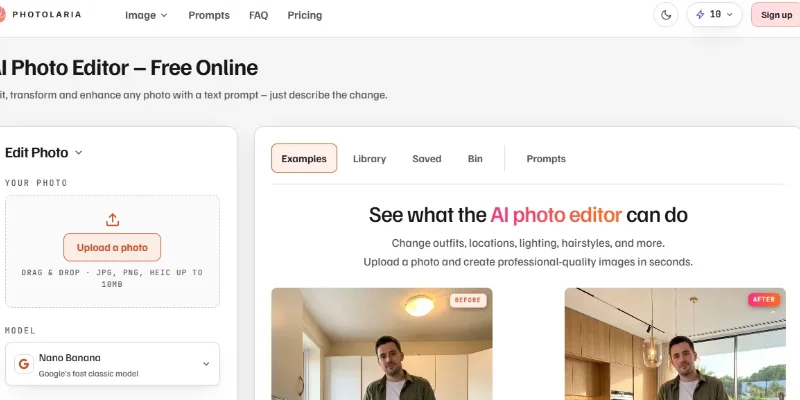
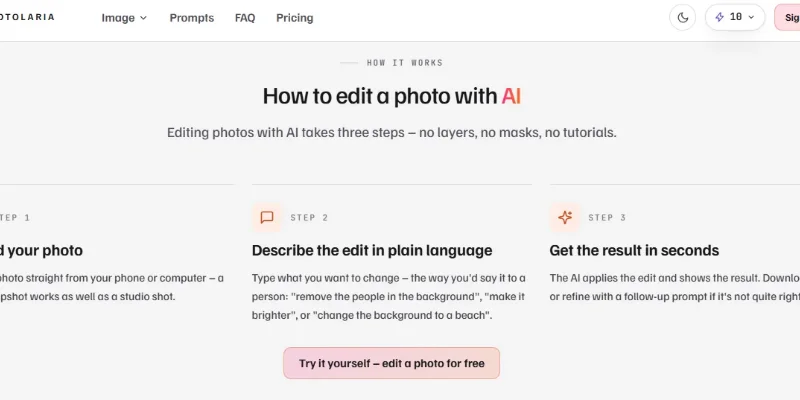
Photolaria is an AI-first creative platform designed to simplify image creation and photo editing. Instead of relying on traditional editing tools, layers, masks, and complicated settings, users can upload a photo and describe the changes they want in plain language. The AI then attempts to apply those changes while preserving important details of the original image.
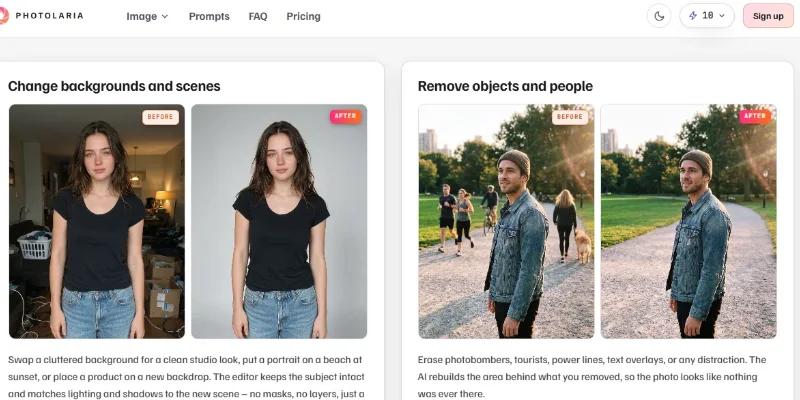
Its AI photo editor supports tasks such as changing backgrounds, modifying outfits and hairstyles, removing unwanted people or objects, improving lighting, creating professional headshots, and restoring old or damaged photographs. Users can also upload multiple reference images to combine elements or create a new scene based on their instructions.
The platform also includes a text-to-image generator for creating new visuals from written prompts. Users can select from several AI models and choose available image resolutions, including 1K, 2K, and 4K. A separate AI image upscaler uses Topaz Labs models to enlarge images, improve sharpness, reconstruct details, and preserve transparent backgrounds for supported PNG files.
Photolaria is useful for content creators, photographers, online sellers, marketers, designers, and small businesses that need product images, social media visuals, portraits, or marketing graphics. Because it operates through a browser, users can access its tools on desktop and mobile devices without installing dedicated editing software.
Verifiable Stats
-
Tool Name: Photolaria.
-
Official Website: https://photolaria.com/
-
Tool Type: AI photo editor, AI image generator, and AI image upscaler.
-
Developer/Company: The website does not clearly identify a legal developer or company name in the information reviewed.
-
AI Models: Includes models from Google, OpenAI, ByteDance, and Black Forest Labs.
-
Photo Editing: Supports prompt-based editing, background replacement, object removal, photo enhancement, outfit changes, and old-photo restoration.
-
Image Generation: Creates new images from text prompts, with selectable AI models and resolutions up to 4K.
-
Image Upscaling: Offers Standard, Enhance, Creative, and Transparent upscaling modes, powered by Topaz Labs models.
-
Platform Availability: Browser-based and accessible through modern desktop and mobile browsers.
-
Pricing Model: Free bonus credits are available, with paid monthly Basic, Pro, and Studio plans for additional credits.
Screenshots & Demo
Key Features
Core capabilities and functionalities provided by Photolaria.
Context-Aware Code Completion & Synthesis
Delivers low-latency inline code completions, multi-token suggestions, and semantic completions customized to the repository context.
Multi-File Codebase Indexing & Exploration
Deeply scans project files, dependency trees, and symbol references to provide comprehensive cross-file edits and refactorings.
Automated Git & Terminal Workflow Automation
Executes shell commands, analyzes test runs, resolves syntax and runtime bugs, and crafts clean commit messages and pull requests.
Architectural Refactoring & Security Audit
Spots security vulnerabilities, dead code paths, and architectural smells, providing one-click semantic fixes and unit tests.
Pros & Cons
Key strengths and potential limitations of Photolaria.
What We Like
- Easy Prompt-Based Photo Editing: Users can edit images by describing changes in everyday language, without needing advanced photo-editing skills or complicated tools
- Multiple AI Models in One Platform: Photolaria provides access to models from Google, OpenAI, ByteDance, and Black Forest Labs, allowing users to select a model based on their creative requirements.
- All-in-One Image Toolkit: It combines photo editing, text-to-image generation, background removal, and AI image upscaling in a single workspace.
- High-Resolution Image Generation: Users can generate images at resolutions up to 4K, making the platform useful for professional visuals and digital content.
- Free Access and Commercial Usage: Users can start with bonus credits, and the platform advertises commercial usage rights across free and paid plans.
Where It Falls Short
- Credit-Based Usage Can Become Expensive: Each generation and editing operation consumes credits, and costs vary depending on the selected AI model and resolution.
- Limited Free Allowance: Free usage depends on temporary bonus credits, which are subject to change and may not be sufficient for frequent image creation.
- Results May Require Multiple Attempts: Complex edits may not perfectly follow the prompt on the first try, so users might need to refine instructions or generate again.
- Limited Manual Editing Controls: Its prompt-first workflow is convenient, but users who prefer detailed control over layers, masks, brushes, and individual adjustments may find it less suitable than traditional editing software.
- Internet Connection Required: Since Photolaria operates through a web browser, users need an internet connection to access its AI editing and generation features. Edit
Use Cases
Discover common workflows and scenarios where Photolaria excels.
Professional Product Photography
Online sellers and e-commerce businesses can improve product photos, replace plain backgrounds, remove unwanted objects, and create attractive product visuals for online stores and marketplaces.
Social Media Content Creation
Content creators and social media managers can generate eye-catching images, edit existing photographs, and produce visuals for Instagram, Facebook, Pinterest, and other digital platforms.
AI Portrait Enhancement
Photographers and individuals can improve portraits, adjust lighting, refine appearances, and create professional-looking headshots for business profiles, portfolios, and personal branding.
Background Replacement
Users can replace distracting or unsuitable photo backgrounds with cleaner, more attractive, or context-specific scenes using AI-assisted editing.
Old Photo Restoration
Families and photography enthusiasts can restore old or damaged photographs, improve image clarity, and bring historical memories back to life through AI enhancement.
Marketing and Advertising Visuals
Marketing teams can generate promotional images, campaign graphics, and creative assets for advertisements, landing pages, email campaigns, and brand promotions.
AI Image Generation for Creative Projects
Designers, artists, and content creators can turn written descriptions into original images for presentations, blogs, websites, creative concepts, and digital projects.
Image Upscaling for Print and Digital Media
Users can increase image resolution and improve visual details for larger displays, presentations, websites, and supported print workflows.
Similar AI Tools
Sharpniq
Sharpniq

Fotor
Turn text or photos into videos plus edit, enhance, and design.

Blur Background
Blur Background

AI Image Cleaner
Remove Unwanted Objects and People from Photos in Seconds

PhotoGrid
Edit, enhance, and collage your photos in one place

AIChangeHair
AIChangeHair

AIClothSwap
AIClothSwap

RemoveMate
RemoveMate
Latest from Our Blog
Tips, tutorials and insights about AI tools and how to use them effectively.

ChatGPT for Brand Voice: Can It Sound Like You?

ChatGPT for Marketing: The Complete 2026 Guide

Best AI Tools for Real Estate Agents in 2026: Listings, Leads and Follow-Up

Google Gemini vs ChatGPT: Which AI Assistant Should You Actually Use?
Reviews & Community Ratings
No reviews yet — be the first to rate and review this tool!
Rate Photolaria
Community Reviews (0)