

Revid
By Revid
Context-aware software development platform for rapid engineering workflows.
Overview
Summary
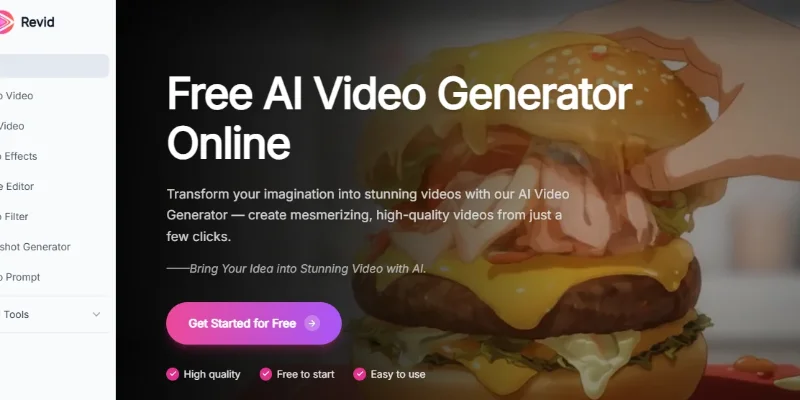
Revid.me is an AI-powered video creation platform that transforms text prompts, static images, and reference materials into engaging videos. It helps creators, marketers, and businesses produce visual content for social media, promotions, storytelling, and creative projects without requiring advanced video-editing skills.
What Is Revid.me?
Revid.me simplifies video creation by allowing users to start with a written idea, an existing image, or reference material. Its AI-powered tools generate videos from text prompts, animate static images, and create video scenes guided by visual references.
The platform also provides AI image-generation and editing tools, allowing users to explore different creative formats through a browser-based workflow. It is designed for people who want to turn ideas into visual content quickly without relying on a traditional video-production process.
Verifiable Stats
-
100,000+ Active Users: The platform advertises more than 100,000 active users.
-
5 Million+ Videos Generated: Revid.me reports over 5 million videos generated using its AI tools.
-
4.9/5 Average Rating: The website displays a 4.9 out of 5 rating; the review sample size and methodology are not specified.
-
3 Core Video Generation Modes: Text-to-Video, Image-to-Video, and Reference-to-Video.
-
Approximately 10 Seconds per Generation: The website advertises video generation times of around 10 seconds or less, although actual processing time may vary.
-
Free Initial Access: Users can try the video-generation tools for free, subject to current usage limits.
-
Commercial-Use Restrictions: The official FAQ states that commercial use requires a subscription, while free-account videos are not permitted for commercial use.
Screenshots & Demo


Key Features
Core capabilities and functionalities provided by Revid.
Context-Aware Code Completion & Synthesis
Delivers low-latency inline code completions, multi-token suggestions, and semantic completions customized to the repository context.
Multi-File Codebase Indexing & Exploration
Deeply scans project files, dependency trees, and symbol references to provide comprehensive cross-file edits and refactorings.
Automated Git & Terminal Workflow Automation
Executes shell commands, analyzes test runs, resolves syntax and runtime bugs, and crafts clean commit messages and pull requests.
Architectural Refactoring & Security Audit
Spots security vulnerabilities, dead code paths, and architectural smells, providing one-click semantic fixes and unit tests.
Pros & Cons
Key strengths and potential limitations of Revid.
What We Like
- Multiple Video Creation Methods: Generate videos from text prompts, animate images, or use visual references to guide creative outputs.
- Fast Content Production: AI-powered workflows help users create video concepts without manually assembling every scene.
- Beginner-Friendly Interface: Prompt-based tools make video creation more accessible to users without advanced editing experience.
- Additional Creative Tools: Advertised image generation, image editing, video enhancement, and effects provide extra options for developing visual content.
- Useful for Social Media: Creators and marketers can experiment with short videos, promotional clips, and visual storytelling for digital platforms.
Where It Falls Short
- Variable Generation Quality: Generated videos may contain visual inconsistencies, unwanted details, or motion that does not match the prompt.
- Limited Creative Control: AI-generated results may require repeated prompts and refinements to achieve the desired appearance or movement.
- Usage Restrictions: Free access may include generation limits, while continued use or additional capabilities may require a subscription.
- Commercial Licensing Conditions: Commercial-use permissions depend on the platform's current subscription terms, so users should check licensing before monetizing videos.
- Processing Times Can Vary: Although the platform advertises fast generation, complex prompts, system demand, and selected features may affect processing time.
Use Cases
Discover common workflows and scenarios where Revid excels.
Text-to-Video Creation
Turn written prompts and scene descriptions into AI-generated videos. This is useful for creators who want to visualize ideas without filming footage themselves.
Image-to-Video Animation
Transform static images into moving clips for storytelling, creative experiments, promotional content, and social media posts.
Reference-Based Video Creation
Use visual references to guide generated videos toward a preferred subject, scene, or aesthetic, where supported by the selected workflow.
Social Media Content Creation
Produce short-form videos for platforms such as Instagram, TikTok, and YouTube Shorts, subject to each platform's content and format requirements.
Product Promotional Videos
Create visual product presentations and promotional clips for online stores, advertising campaigns, and product launches.
Marketing and Advertising
Develop video concepts for brand awareness, campaign creatives, promotional messages, and digital advertisements.
Educational Video Production
Convert ideas and written explanations into visual clips for tutorials, learning resources, and educational presentations.
Explainer Video Creation
Visualize processes, concepts, or services through AI-generated scenes that help communicate information to an audience.
Similar AI Tools







Latest from Our Blog
Tips, tutorials and insights about AI tools and how to use them effectively.

ChatGPT for Brand Voice: Can It Sound Like You?

ChatGPT for Marketing: The Complete 2026 Guide

Best AI Tools for Real Estate Agents in 2026: Listings, Leads and Follow-Up

Google Gemini vs ChatGPT: Which AI Assistant Should You Actually Use?
Reviews & Community Ratings
Average rating: 8.5 out of 5 (1 total reviews)
Rate Revid
Community Reviews (0)