

TubeRepeat
By TubeRepeat
Intelligent developer copilot automating code completion, refactoring, and debugging.
Overview
Summary: TubeRepeat is a free, browser-based YouTube video looping and repeat tool that allows users to replay an entire video or a specific section repeatedly. It uses A–B loop controls to mark precise starting and ending points, enabling users to isolate difficult musical passages, spoken sentences, dance movements, or educational explanations. The platform also offers adjustable playback speeds from 25% to 200%, keyboard shortcuts, repetition tracking, progressive speed training, and shareable practice links. No account registration, browser extension, or video download is required. It is designed for musicians, language learners, students, dancers, and anyone who wants to practise specific parts of YouTube videos.
What is TubeRepeat?
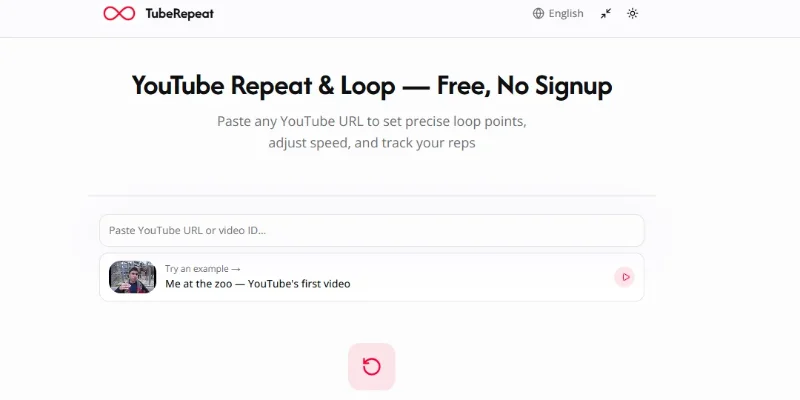
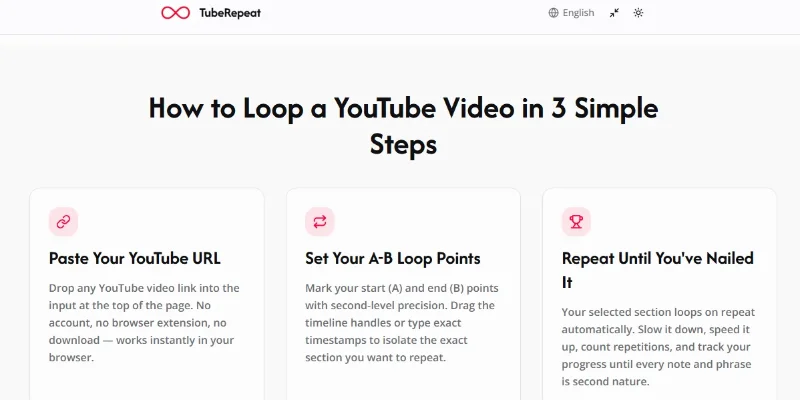
TubeRepeat is an online YouTube repeat and looping tool designed to make focused video practice easier. Users can paste a YouTube video URL into the platform and select a particular section to replay continuously instead of repeatedly searching for the same moment in the original video.
Its primary feature is A–B looping, which allows users to mark point A as the starting position and point B as the ending position. The selected section automatically repeats, making it useful for practising a musical phrase, understanding a spoken sentence, reviewing a lecture explanation, or learning a particular movement. Users can adjust loop points through timeline markers or enter specific timestamps.
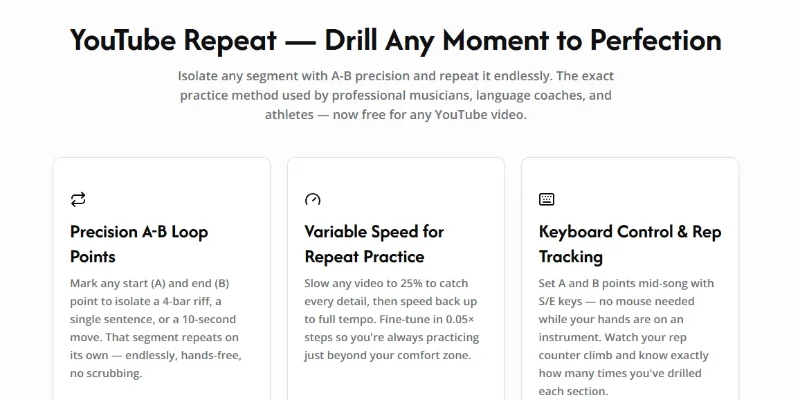
The platform also includes adjustable playback speed, allowing users to slow videos down to 25% or increase playback speed up to 200%. Fine-grained speed adjustments help musicians practise difficult passages, language learners follow native speakers, and students understand complex explanations at a comfortable pace.
For more structured practice, TubeRepeat offers repetition counting and progressive speed training. Users can automatically increase playback tempo after a selected number of repetitions, helping them gradually move from slower practice to normal-speed performance. Keyboard shortcuts also allow users to set loop points and control playback without repeatedly using the mouse.
TubeRepeat supports saved practice sessions and shareable links that preserve the selected YouTube video, loop start and end points, and playback speed. This makes it easier for teachers, students, musicians, and collaborators to share specific sections for focused practice. The video continues playing through YouTube's embedded player; TubeRepeat does not download or copy the video.
The platform is particularly useful for music practice, language learning, dance choreography, sports technique analysis, educational video review, and other activities that require repeating a specific video segment.
Verifiable Stats
-
Tool Name: TubeRepeat.
-
Official Website: https://www.tuberepeat.ai/.
-
Tool Type: YouTube Video Looping and Repeat Tool.
-
Platform: Browser-based online application.
-
Core Feature: A–B looping to repeat selected video segments.
-
Playback Speed: Adjustable from 25% to 200%.
-
Loop Precision: Timeline markers and timestamp controls for selecting specific sections.
-
Practice Features: Repetition counter, keyboard shortcuts, and progressive speed training.
-
Session Management: Save named loop sessions and generate shareable links.
-
Installation Requirements: No account, browser extension, or software download required
Screenshots & Demo
Key Features
Core capabilities and functionalities provided by TubeRepeat.
Context-Aware Code Completion & Synthesis
Delivers low-latency inline code completions, multi-token suggestions, and semantic completions customized to the repository context.
Multi-File Codebase Indexing & Exploration
Deeply scans project files, dependency trees, and symbol references to provide comprehensive cross-file edits and refactorings.
Automated Git & Terminal Workflow Automation
Executes shell commands, analyzes test runs, resolves syntax and runtime bugs, and crafts clean commit messages and pull requests.
Architectural Refactoring & Security Audit
Spots security vulnerabilities, dead code paths, and architectural smells, providing one-click semantic fixes and unit tests.
Pros & Cons
Key strengths and potential limitations of TubeRepeat.
What We Like
- Precise A–B Video Looping: Users can select exact starting and ending points to repeat difficult sections without replaying the entire video.
- Adjustable Playback Speed: Supports playback speeds from 25% to 200%, helping users practise at a comfortable pace.
- Progressive Speed Training: Allows users to gradually increase playback speed after a chosen number of repetitions, making it useful for music and skill practice.
- No Installation Required: Works directly in a browser without requiring an account, software download, or browser extension.
- Shareable Practice Sessions: Users can save loop settings and share links containing selected video sections and playback preferences
Where It Falls Short
- YouTube Dependency: The tool relies on YouTube's embedded player, so videos with embedding restrictions, regional limitations, or access restrictions may not work.
- Limited to YouTube Content: It is primarily designed for YouTube videos and does not function as a universal looping tool for every video platform.
- No Offline Playback: Users need an internet connection and an accessible YouTube video to use the platform
- Limited Video Editing Features: It focuses on looping and playback control rather than advanced editing, trimming, subtitles, or video production.
- Playback Experience Can Vary: Embedded player behavior, video availability, and playback performance may depend on YouTube and the user's browser or network.
Use Cases
Discover common workflows and scenarios where TubeRepeat excels.
Music Instrument Practice
Repeat difficult musical passages, guitar riffs, piano melodies, and drum patterns to practise specific sections until they become easier to perform.
Language Learning and Pronunciation
Replay conversations, native-speaker dialogues, and pronunciation examples to improve listening comprehension, vocabulary, speaking skills, and accent familiarity.
Dance Choreography Training
Loop specific dance sequences and slow down playback to understand individual movements, footwork, rhythm, and transitions.
Online Lecture Revision
Repeat important explanations, complex concepts, and educational demonstrations from YouTube lectures to improve understanding and retention.
Sports Technique Analysis
Replay instructional videos showing particular sports movements, exercises, and techniques to study body positioning, timing, and coordination.
Singing and Vocal Training
Practise difficult vocal passages, melodies, harmonies, and pronunciation by repeating short sections at adjustable playback speeds.
Coding Tutorial Practice
Loop programming demonstrations, command-line instructions, and complex coding explanations so learners can follow each step while practising independently.
Public Speaking and Presentation Skills
Replay speeches, presentations, and communication examples to study pronunciation, speaking pace, pauses, body language, and delivery techniques.
Similar AI Tools

Descript AI
Delete Filler Words, Fix Awkward Pauses, and Edit Videos by Simply Editing the Transcript.

Synthesys AI
Turn Text into Professional AI Videos and Voiceovers Instantly

Wayin Video
Turn Long Videos into Viral Clips or Create Cinematic AI Videos

Luma Labs
Next-Gen AI Video Generator, Ray Models & Interactive 3D World Capture

Runway ML
Next-Generation AI Video Generation & Creative Multimodal Studio

Kling 3.0
Kling 3.0

ClipFinder
Paste a YouTube or Twitch link — ClifFinder finds your best clips in minutes

Fliki AI
Turn any script into a narrated video, in 80+ languages with 2,000+ voices
Latest from Our Blog
Tips, tutorials and insights about AI tools and how to use them effectively.

ChatGPT for Brand Voice: Can It Sound Like You?

ChatGPT for Marketing: The Complete 2026 Guide

Best AI Tools for Real Estate Agents in 2026: Listings, Leads and Follow-Up
