

Vidmud Photo Editor
By Vidmud Photo Editor
AI-powered coding companion built for high-velocity software engineering.
Overview
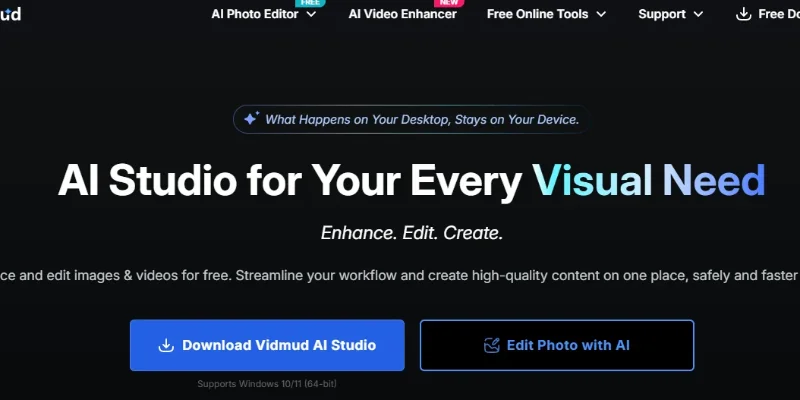
Summary: Vidmud is an AI-powered creative studio for enhancing, editing, and generating images and videos. It combines AI photo enhancement, video upscaling, noise reduction, object removal, background replacement, image editing, and image-to-video animation in one platform. Available through online tools and a Windows desktop application, Vidmud helps creators, photographers, designers, marketers, and businesses improve visual content without requiring advanced editing skills. The company states that it was founded in 2024.
What is Vidmud?
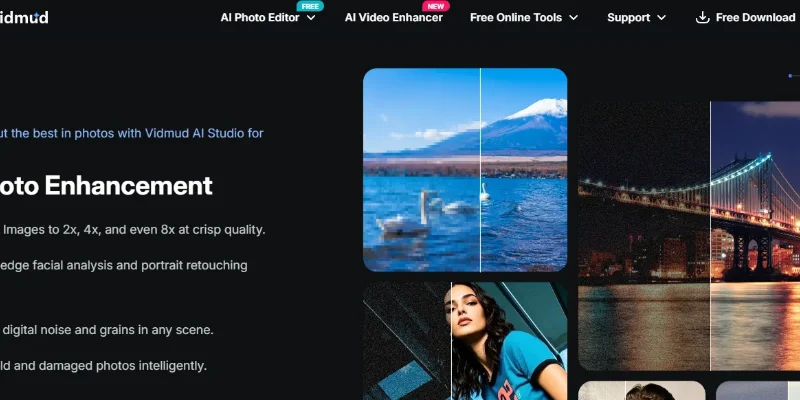
Vidmud is an all-in-one AI visual content platform designed to simplify photo and video enhancement. Users can improve image resolution, sharpen blurry details, reduce digital noise, restore damaged photographs, and enhance portrait quality. Its image enhancement tools advertise upscaling up to 2×, 4×, and 8×, along with facial retouching and colour improvement.
For video editing, Vidmud offers AI-powered video enhancement that can upscale footage to 1080p, 2K, and 4K, reduce noise and blur, improve lighting and colours, and increase frame rates through AI frame interpolation. Its online video enhancer supports common formats such as MP4, MOV, WebM, and M4V, with a stated maximum upload size of 200 MB and video duration of 20 minutes.
Vidmud also provides AI image editing tools, including background removal and replacement, object replacement, person removal, face retouching, style transfer, and AI outpainting. Its Chat to Edit feature allows users to describe desired visual changes using natural-language instructions, while Brush and Erase helps remove unwanted elements from images.
Beyond enhancement and editing, Vidmud supports creative image-to-video workflows. Users can animate still photographs, transform sketches into videos, create motion graphics, and apply AI-powered visual effects. These capabilities make it useful for social media content, marketing campaigns, photography, storytelling, and personal projects.
Verifiable Stats
-
Tool Name: Vidmud.
-
Official Website: https://www.vidmud.com/
-
Founded: 2024, according to the company's About page.
-
Primary Purpose: AI-powered image and video enhancement, editing, and content creation.
-
Photo Enhancement: Image upscaling, portrait retouching, colour enhancement, noise reduction, and old-photo restoration.
-
Video Enhancement: Video upscaling, sharpening, denoising, colour correction, and frame-rate enhancement.
-
AI Editing Features: Object removal, background replacement, person removal, style transfer, and AI outpainting.
-
Creative Features: Image-to-video generation, sketch animation, and AI motion graphics.
-
Desktop Compatibility: Vidmud AI Studio supports Windows 10 and Windows 11 (64-bit).
-
Company-Reported Reach: More than 120,000 active creators, 18 million generations processed, and users across 180+ countries. These figures are reported by Vidmud and are not independently verified.
Screenshots & Demo
Key Features
Core capabilities and functionalities provided by Vidmud Photo Editor.
Context-Aware Code Completion & Synthesis
Delivers low-latency inline code completions, multi-token suggestions, and semantic completions customized to the repository context.
Multi-File Codebase Indexing & Exploration
Deeply scans project files, dependency trees, and symbol references to provide comprehensive cross-file edits and refactorings.
Automated Git & Terminal Workflow Automation
Executes shell commands, analyzes test runs, resolves syntax and runtime bugs, and crafts clean commit messages and pull requests.
Architectural Refactoring & Security Audit
Spots security vulnerabilities, dead code paths, and architectural smells, providing one-click semantic fixes and unit tests.
Pros & Cons
Key strengths and potential limitations of Vidmud Photo Editor.
What We Like
- All-in-One AI Enhancement: Combines photo enhancement, video upscaling, noise reduction, restoration, and editing tools in one platform.
- High-Resolution Upscaling: Supports image enlargement up to 8× and video enhancement up to 4K, helping improve the quality of lower-resolution content.
- Easy AI Editing: Natural-language editing and brush-based tools make it easier to remove unwanted objects, replace backgrounds, and modify images.
- Photo and Video Restoration: Helps restore old photographs, sharpen blurry images, reduce video noise, and improve visual details.
- Multiple Access Options: Offers browser-based tools and a Windows desktop application, giving users flexibility in how they work.
Where It Falls Short
- Feature-Specific Usage Limits: Free access and daily limits may restrict users who need frequent or large-scale processing.
- Credit Consumption: Advanced AI features, particularly generative tools, may consume credits and require a paid plan.
- Processing Time: High-resolution video enhancement and AI generation can take longer, depending on file size and processing complexity.
- AI Enhancement Limitations: Upscaling and restoration may introduce artificial details or distort faces when the original media is severely damaged or blurry.
- Platform Compatibility: The dedicated desktop application is designed for Windows, which may limit users who prefer macOS or Linux desktop software.
Use Cases
Discover common workflows and scenarios where Vidmud Photo Editor excels.
Photo Enhancement and Restoration
Improve old, faded, blurry, or damaged photographs using AI-powered restoration and enhancement tools. Users can sharpen details, reduce noise, and improve image clarity.
Video Upscaling for High-Resolution Content
Convert low-resolution video footage into higher-resolution outputs, including 1080p, 2K, and 4K. This is useful for creators preparing videos for modern displays and digital platforms.
E-commerce Product Image Improvement
Enhance product photographs by improving sharpness, colours, lighting, and image resolution. Online sellers can prepare clearer product visuals for websites, catalogues, and advertisements.
Social Media Content Creation
Prepare high-quality images and videos for Instagram, YouTube, TikTok, and other social platforms. Creators can enhance footage, remove unwanted elements, and produce visually appealing content.
Background Removal and Replacement
Remove distracting backgrounds from product photos, portraits, and promotional images. Users can replace them with cleaner or more suitable backgrounds for different creative projects.
Unwanted Object and Person Removal
Erase unwanted objects, people, or distractions from photographs using AI editing tools. This helps improve travel photos, product images, and personal pictures.
Portrait and Face Enhancement
Improve portrait photographs by enhancing facial details, reducing imperfections, and refining image quality. This is useful for profile pictures, professional headshots, and personal photography.
Old Video Restoration
Improve older or low-quality video footage by reducing noise, sharpening details, and enhancing colours. This can help users make archived recordings more suitable for modern viewing.
Similar AI Tools

Sharpniq
Sharpniq

Fotor
Turn text or photos into videos plus edit, enhance, and design.

Blur Background
Blur Background

AI Image Cleaner
Remove Unwanted Objects and People from Photos in Seconds

PhotoGrid
Edit, enhance, and collage your photos in one place

AIChangeHair
AIChangeHair

AIClothSwap
AIClothSwap

RemoveMate
RemoveMate
Latest from Our Blog
Tips, tutorials and insights about AI tools and how to use them effectively.

ChatGPT for Brand Voice: Can It Sound Like You?

ChatGPT for Marketing: The Complete 2026 Guide

Best AI Tools for Real Estate Agents in 2026: Listings, Leads and Follow-Up

Google Gemini vs ChatGPT: Which AI Assistant Should You Actually Use?
Reviews & Community Ratings
No reviews yet — be the first to rate and review this tool!
Rate Vidmud Photo Editor
Community Reviews (0)