Buda
By Buda
AI-powered coding companion built for high-velocity software engineering.
Overview
Summary: Buda is a cloud-native multi-agent AI workspace that enables individuals and businesses to recruit, manage, and coordinate teams of AI agents to perform real-world tasks. Instead of functioning as a traditional AI chatbot, Buda provides each agent with its own cloud computer, browser, terminal, Git tools, persistent memory, and file storage. Users can assign tasks through natural-language instructions while agents independently research information, write code, build websites, analyze data, manage files, and automate business workflows. Its Organizer coordinates multiple agents, allowing them to collaborate and execute tasks in parallel without requiring local hardware or complicated setup.
What is Buda AI?
Buda is an AI agent management and execution platform designed to help users operate AI agents like a coordinated workforce. It follows an Agents as a Company approach, where users act as decision-makers, Buda's Organizer coordinates the work, and individual AI agents execute assigned tasks in their own cloud environments.
One of its main features is the Cloud Computer, which gives every agent an isolated computing environment with access to files, a browser, terminal commands, and Git. This allows agents to perform practical tasks such as browsing websites, conducting research, writing and running code, editing files, testing applications, and developing digital products. Users can monitor agent activities and review the generated outputs.
Buda also offers persistent memory and Drive storage, allowing agents to retain relevant files, instructions, and project information between sessions. Its reusable Skills feature lets users turn repeated procedures into repeatable capabilities, while scheduled Automations allow agents to execute recurring tasks without requiring manual instructions each time.
Another important capability is multi-agent collaboration. Buda's Organizer can coordinate specialized agents, distribute work, and manage multi-step projects. Users can also connect agents to communication channels such as Slack, Telegram, Discord, WhatsApp, Microsoft Teams, and Feishu/Lark, allowing them to receive tasks and deliver results through familiar messaging platforms.
The platform supports several practical applications, including software development, website creation, market research, sales outreach, content production, customer support, spreadsheet analysis, and business operations. It also provides a marketplace for discovering ready-made agents, Skills, and workflow templates, along with API and MCP capabilities for developers building agent-powered applications.
Verifiable Stats
-
Developer: Buda (independently developed AI platform).
-
Platform Type: Cloud-Native AI Agent Workspace / Multi-Agent Automation Platform.
-
Core Technology: Autonomous AI Agents, Multi-Agent Orchestration, Cloud Computing, Persistent Memory, and Workflow Automation.
-
Key Features: AI Agent Teams, Cloud Computers, Organizer, Agent Drive, Shared Space Drive, Browser Automation, Terminal, Git, Skills, and Scheduled Automations.
-
Supported Channels: Slack, Telegram, Discord, Feishu/Lark, WeCom, WhatsApp, Microsoft Teams, and Website Widget.
-
Developer Capabilities: REST API, MCP integration, and hosted AI agents.
-
Free Plan: $0/month, with 2 agents and 300 credits per day.
-
Paid Plans: Plus at $20 per agent/month and Pro at $100 per agent/month; Enterprise pricing is customized.
-
Deployment Options: Cloud-hosted and enterprise self-hosted deployment.
-
Primary Audience: Founders, developers, entrepreneurs, freelancers, startups, and business teams.
Screenshots & Demo
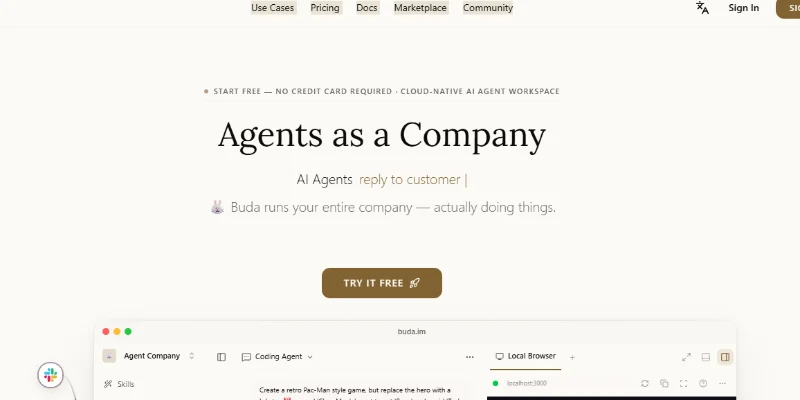
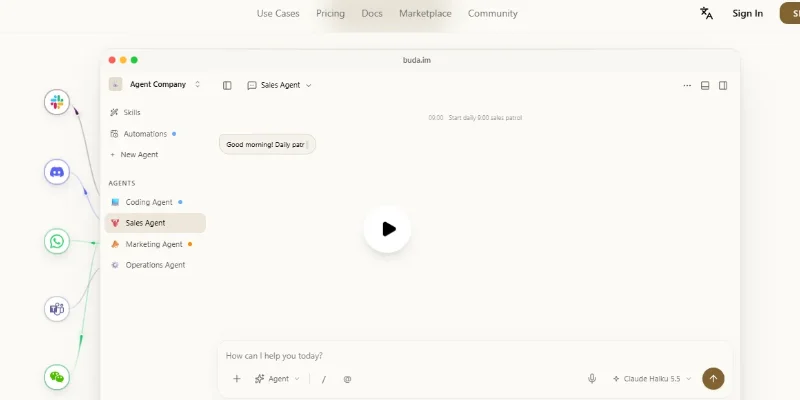
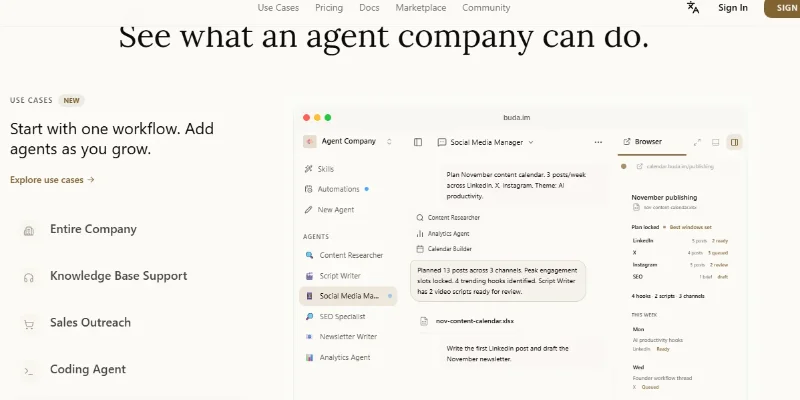
Key Features
Core capabilities and functionalities provided by Buda.
Context-Aware Code Completion & Synthesis
Delivers low-latency inline code completions, multi-token suggestions, and semantic completions customized to the repository context.
Multi-File Codebase Indexing & Exploration
Deeply scans project files, dependency trees, and symbol references to provide comprehensive cross-file edits and refactorings.
Automated Git & Terminal Workflow Automation
Executes shell commands, analyzes test runs, resolves syntax and runtime bugs, and crafts clean commit messages and pull requests.
Architectural Refactoring & Security Audit
Spots security vulnerabilities, dead code paths, and architectural smells, providing one-click semantic fixes and unit tests.
Native IDE & CLI Integration
Seamlessly operates within developer terminals and mainstream code editors without interrupting daily engineering flow.
Pros & Cons
Key strengths and potential limitations of Buda.
What We Like
- Multi-Agent Collaboration: Buda allows users to coordinate multiple specialized AI agents through its Organizer. Different agents can work on separate tasks and contribute to larger projects.
- Dedicated Cloud Computers: Each agent receives its own cloud computing environment with browser, terminal, file storage, and Git access, allowing it to perform practical tasks independently.
- Automated Workflow Execution: Users can assign multi-step tasks through natural-language instructions, reducing the need to manually perform repetitive operations.
- Persistent Memory and Storage: Buda provides persistent memory and Drive storage so agents can retain relevant project information, files, and instructions between sessions.
- Wide Range of Integrations: Support for communication platforms such as Slack, Telegram, Discord, WhatsApp, and Microsoft Teams makes it easier to interact with agents through existing business channels.
Where It Falls Short
- Credit Consumption: AI agent activities consume credits, and complex tasks involving multiple agents may use resources quickly. Users may need a higher subscription tier for frequent workloads.
- Per-Agent Subscription Pricing: Paid plans are priced per agent, which can become expensive for businesses that want to operate larger AI teams
- Learning Curve: Understanding agent coordination, cloud environments, Skills, integrations, and automation settings may take time, particularly for first-time users.
- AI Output Requires Verification: Agents can make mistakes, misunderstand instructions, or produce incomplete results. Human review is important before using outputs in production or making business decisions.
- Complex Workflow Configuration: Building reliable multi-agent workflows may require clear task definitions, suitable agent assignments, and careful configuration.
Use Cases
Discover common workflows and scenarios where Buda excels.
Automated Market Research
Businesses can assign AI agents to research industries, identify market trends, compare competitors, collect relevant information, and prepare structured reports. Multiple agents can investigate different market segments simultaneously.
Website Development
Developers can use Buda agents to create website structures, write frontend and backend code, manage project files, and test website functionality through cloud-based development environments.
Software Development and Coding
AI agents can assist with writing code, debugging errors, reviewing existing code, managing Git repositories, and implementing software features. Specialized agents can handle different development tasks.
SEO Research and Content Creation
Marketing teams can assign agents to research keywords, analyze search results, prepare article outlines, write blog content, and organize SEO-related information for content campaigns.
Competitor Analysis
Businesses can use multiple agents to investigate competitor websites, compare product offerings, review pricing information, identify marketing strategies, and generate competitive intelligence reports.
Lead Generation and Prospect Research
Sales teams can automate prospect research by assigning agents to identify potential customers, collect publicly available business information, organize leads, and prepare prospect summaries.
Data Collection and Web Research
Buda agents can browse websites, gather relevant information, extract publicly available data, organize findings, and save research results in structured files for further analysis.
Business Workflow Automation
Organizations can automate repetitive operations such as document preparation, information collection, report generation, and routine administrative tasks using scheduled AI agent workflows.
Similar AI Tools
Wordware AI
Next-generation AI code assistant with deep multi-file repository understanding.
Zapier Agents
Next-generation AI code assistant with deep multi-file repository understanding.
Leapd
AI-powered coding companion built for high-velocity software engineering.
Stackmint
Context-aware software development platform for rapid engineering workflows.
Springbrand
Build AI Agents That Research, Create, and Automate Tasks
Cloudflare OS
Research, Analyze Data, Build Apps, Create Documents, and Automate Work with Cloudflare
Lindy.ai
AI-powered coding companion built for high-velocity software engineering.
Team9
AI-powered coding companion built for high-velocity software engineering.
Latest from Our Blog
Tips, tutorials and insights about AI tools and how to use them effectively.
ChatGPT for Brand Voice: Can It Sound Like You?

ChatGPT for Marketing: The Complete 2026 Guide

Best AI Tools for Real Estate Agents in 2026: Listings, Leads and Follow-Up