

Floatboat
By Floatboat
AI-powered coding companion built for high-velocity software engineering.
Overview
Summary: Floatboat is an AI-powered, agent-native workspace developed by AOE Tech Labs Limited. It combines an AI agent, file manager, browser, multiple AI models, and workflow automation tools in a unified desktop environment. Users can delegate complex tasks such as researching topics, organizing files, creating presentations, generating reports, building websites, drafting emails, and managing work processes. Floatboat also learns from users' working patterns, preferences, and previous tasks to maintain context and improve future workflows. It is designed for professionals, entrepreneurs, creators, developers, and businesses looking to automate everyday work through AI agents.
What is Floatboat?
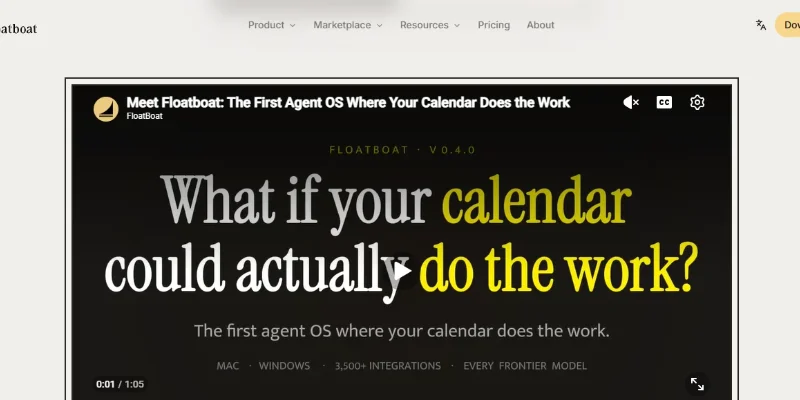
Floatboat is an all-in-one AI agent workspace designed to bring artificial intelligence directly into users' everyday work environments. Instead of switching between separate AI chatbots, browsers, file managers, and productivity applications, users can access these capabilities through one integrated desktop workspace.
One of its core capabilities is its AI Agent, which can perform multi-step tasks using natural-language instructions. Users can ask it to organize and rename files, summarize documents, conduct online research, prepare presentations, generate HTML pages, create schedules, and draft or send emails. The agent can work with local files and browser context, reducing the need for repeated file uploads and manual copy-pasting.
Floatboat also supports multiple AI models from providers such as OpenAI, Anthropic, Google, and DeepSeek. Users can select available models or use Auto Mode, which routes tasks to suitable models. Its multimedia capabilities include AI image generation and video creation through supported models and specialized workflow combinations.
Another important feature is its Combo Skills ecosystem. These reusable AI workflows help users automate specialized tasks such as content creation, research, presentations, and contract analysis. Floatboat can recommend workflows based on completed tasks and allows users to create, customize, import, and share their own combinations. It also supports third-party automation ecosystems such as Dify, n8n, and Coze.
The platform includes a context-aware workspace that can learn from users' preferences, editing habits, decisions, and previous work. This helps AI agents understand how users work and apply that context to similar future tasks. Floatboat is primarily designed as a desktop application for macOS and Windows, with integrations for tools such as GitHub, Notion, Slack, Google Workspace, Microsoft Word, and local browsers.
Verifiable Stats
-
Developer: AOE Tech Labs Limited.
-
Founder: Bruce Tan.
-
Launch Date: May 26, 2026, according to its global launch announcement.
-
Headquarters: San Francisco, California, USA, as stated in its launch announcement.
-
Product Type: AI Agent Workspace and Workflow Automation Platform.
-
Supported Platforms: macOS and Windows desktop applications.
-
AI Model Providers: OpenAI, Anthropic, Google, and DeepSeek.
-
Core Capabilities: AI task execution, file management, web research, document creation, email drafting, and workflow automation.
-
Integrations: GitHub, Notion, Slack, Google Workspace, Microsoft Word, local browsers, and additional tools.
-
Workflow Ecosystem: Combo Skills, reusable AI workflows, and third-party automation imports.
Screenshots & Demo


Key Features
Core capabilities and functionalities provided by Floatboat.
Context-Aware Code Completion & Synthesis
Delivers low-latency inline code completions, multi-token suggestions, and semantic completions customized to the repository context.
Multi-File Codebase Indexing & Exploration
Deeply scans project files, dependency trees, and symbol references to provide comprehensive cross-file edits and refactorings.
Automated Git & Terminal Workflow Automation
Executes shell commands, analyzes test runs, resolves syntax and runtime bugs, and crafts clean commit messages and pull requests.
Architectural Refactoring & Security Audit
Spots security vulnerabilities, dead code paths, and architectural smells, providing one-click semantic fixes and unit tests.
Pros & Cons
Key strengths and potential limitations of Floatboat.
What We Like
- All-in-One AI Workspace: Combines an AI agent, file manager, browser, and workflow tools in one desktop application, reducing the need to switch between multiple productivity platforms.
- Powerful Multi-Step Task Automation: Can handle complex tasks such as organizing files, preparing research reports, generating presentations, drafting emails, and creating schedules through natural-language instructions.
- Multiple AI Model Support: Provides access to models from providers such as OpenAI, Anthropic, Google, and DeepSeek, giving users flexibility to choose suitable models for different tasks.
- Extensive Integrations: Connects with tools such as GitHub, Notion, Slack, Google Workspace, Microsoft Word, and local files, helping users manage workflows across existing applications.
- Reusable Combo Skills: Offers customizable AI workflows for tasks such as content creation, research, presentations, and contract analysis. Users can also import automation workflows from platforms such as n8n, Dify, and Coze.
Where It Falls Short
- Credit-Based Usage: AI operations consume credits, so frequent users may need additional credit packs or a higher subscription plan to continue using resource-intensive features.
- Desktop-First Availability: Its main workspace is designed for macOS and Windows, which may limit users who prefer working entirely through a browser or on mobile devices.
- Privacy and Permission Considerations: Some features require access to local files, browser activity, and connected applications. Users should carefully review permissions before enabling agent actions.
- AI Output Requires Human Review: Like other AI agent platforms, Floatboat can generate inaccurate information or make unintended changes. Important files, emails, and automated actions should be reviewed.
- Third-Party Workflow Risks: Imported or community-created Combo Skills may contain errors or unsafe operations. Users should inspect workflows before granting them access to local files or applications.
Use Cases
Discover common workflows and scenarios where Floatboat excels.
Automating Daily Work Tasks
Use Floatboat's AI agents to handle repetitive activities such as organizing files, preparing documents, drafting emails, and managing everyday work tasks through natural-language instructions
Conducting Research and Preparing Reports
Research topics, gather information from online sources, summarize findings, and turn collected information into structured reports for business, academic, or professional projects.
Creating Business Presentations
Generate presentation outlines, organize research into slides, and prepare professional PowerPoint presentations for meetings, client pitches, and internal business discussions.
Managing Files and Documents
Organize local files, rename documents, summarize lengthy reports, and retrieve relevant information from stored materials without manually opening every file.
Managing Emails and Communication
Draft email responses, prepare follow-up messages, summarize communication, and organize work-related correspondence with connected email tools.
Automating Calendar-Based Workflows
Use calendar information to prepare meeting briefs, organize schedules, create reminders, and generate follow-up materials based on upcoming events.
Building Websites and Web Content
Use AI agents to generate HTML pages, create website content, prepare landing-page drafts, and assist with basic web development tasks.
Streamlining Software Development
Connect development workflows with GitHub and other supported tools to assist with code-related research, project documentation, task organization, and development activities.
Similar AI Tools

Microsoft Copilot
Everyday AI Companion Across Windows, Office & Web
EinfachAI
EinfachAI

Zapier-AI
Autonomous AI agents, AI Copilot, and intelligent workflow automation connected to 7,000+ business apps

Make
Build Powerful No-Code Automations to Connect All Your Favorite Apps

Novastart
Organize Apps, Collaborate with Teams, and Run Multiple AI Agents in Parallel on One Infinite Canvas.

Boxy AI
Automate your emails and replies, effortlessly
Foneclaw ai
Intelligent developer copilot automating code completion, refactoring, and debugging.
Jasmine AI
Your personal AI companion that helps with daily tasks, support, and productivity
Latest from Our Blog
Tips, tutorials and insights about AI tools and how to use them effectively.

The 10 Best AI Data Analysis Tools in 2026: ChatGPT, Copilot, and Julius AI Compared
Best AI Tools for Social Media and Thumbnails in 2026
Top AI Tool Directories to Submit To: Complete Guide (2026)
Best Paid AI Tools Worth the Money in 2026: Complete Guide
Reviews & Community Ratings
No reviews yet — be the first to rate and review this tool!
Rate Floatboat
Community Reviews (0)