

Lumo 2.0
By Lumo 2.0
Intelligent developer copilot automating code completion, refactoring, and debugging.
Overview
Summary: Lumo 2.0 is Proton's AI assistant, announced on June 30, 2026. Proton is the Swiss company behind Proton Mail, VPN and Drive. Lumo runs on Proton's European infrastructure, is protected by Swiss privacy law, uses zero-access encryption for saved chats and keeps its apps open source. It is free to try without an account, with Plus at $12.99 per month.
What is Lumo 2.0?
Lumo launched in July 2025 as a privacy-focused alternative to mainstream chatbots, and Proton says it passed 10 million users. Version 2.0 is described as the biggest upgrade yet, rebuilt on a new architecture with two models: Lumo 2.0 Lite for everyday tasks and Lumo 2.0 Max for demanding work. Each can run in Fast mode or Thinking mode, which shows its reasoning in progress.
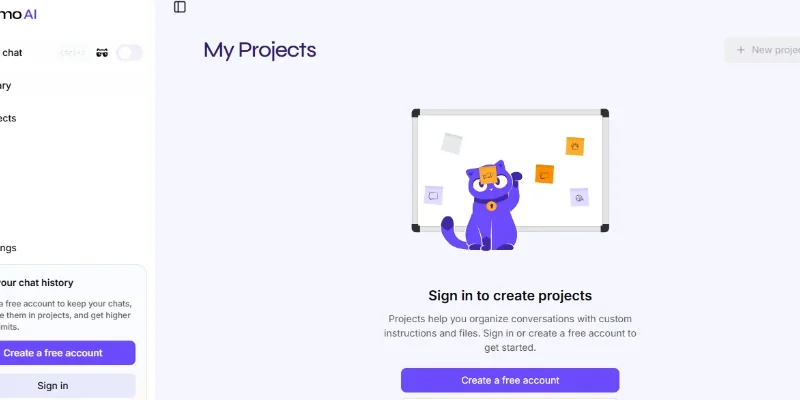
According to Proton, everyday queries respond up to 76% faster than on Lumo 1.4, and the context window doubled. Lumo 2.0 can understand images, generate and edit them, search the web with cited sources, remember preferences you control, organize work in Projects and run Custom Lumos, assistants tuned for specific tasks.
On performance, Proton reports that Lumo 2.0 Lite scores 127% higher and Lumo 2.0 Max 240% higher than Lumo 1.4 on the Artificial Analysis Intelligence Index, with scores of 34 and 51 versus 15. These are Proton's figures and had not been independently verified when announced. Proton's privacy design is the main reason to choose it: no chat logging, no data sharing and zero-access encryption of saved history.
Who is Lumo best for?
Lumo suits privacy-conscious individuals, journalists, lawyers, health and finance professionals, and European organizations that want AI under European and Swiss data rules. It is also a natural fit if you already use Proton Mail, Drive or Workspace. If you need the very newest frontier model capabilities, compare it against larger assistants first.
Key facts
- Plans (US): Free; Lumo Plus at $12.99 per month; Lumo Professional for teams at $14.99 per user per month. Annual billing discounts apply. Lumo for Business is also bundled into Proton Workspace.
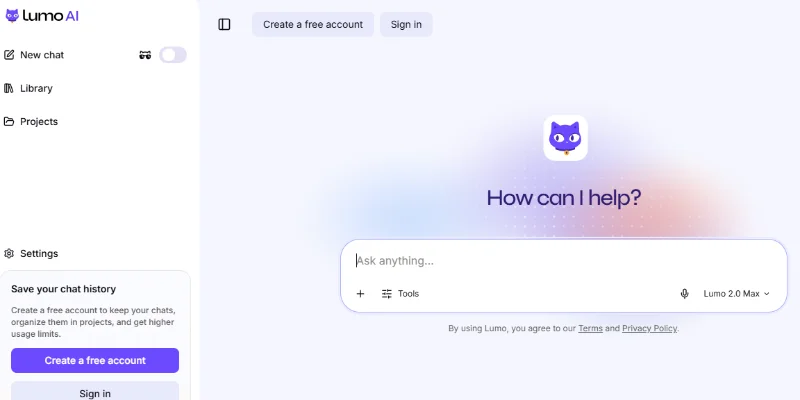
- Access: web at lumo.proton.me (no account needed to start), iOS and Android apps and browser extensions.
- Interface languages on iOS: English, Czech, Dutch, French, German, Italian, Polish, Portuguese, Russian, Spanish and Turkish.
- Open source: Proton says Lumo is fully open source so anyone can inspect the code and encryption.
Screenshots & Demo
Key Features
Core capabilities and functionalities provided by Lumo 2.0.
Context-Aware Code Completion & Synthesis
Delivers low-latency inline code completions, multi-token suggestions, and semantic completions customized to the repository context.
Multi-File Codebase Indexing & Exploration
Deeply scans project files, dependency trees, and symbol references to provide comprehensive cross-file edits and refactorings.
Automated Git & Terminal Workflow Automation
Executes shell commands, analyzes test runs, resolves syntax and runtime bugs, and crafts clean commit messages and pull requests.
Architectural Refactoring & Security Audit
Spots security vulnerabilities, dead code paths, and architectural smells, providing one-click semantic fixes and unit tests.
Pros & Cons
Key strengths and potential limitations of Lumo 2.0.
What We Like
- Strong Privacy and Data Protection: Lumo uses zero-access encryption for saved conversations and states that user chats are not used to train its AI models. This makes it suitable for users who prioritize confidentiality
- Guest Access Without Registration: Users can start chatting without creating a Proton account, making it easy to try the assistant without a lengthy signup process.
- Wide Range of AI Capabilities: Lumo supports writing, translation, research, document summarization, coding assistance, mathematical problem-solving, and image generation in one platform
- Optional Web Search: Its web search feature helps users find more recent information instead of relying entirely on the built-in knowledge of AI models
- Open-Source and Proton-Based Infrastructure: Lumo uses open-source AI models hosted on servers controlled by Proton. Its open-source approach also provides greater transparency into the technology behind the service
Where It Falls Short
- Limited Free-Plan Usage: The free plan restricts messages, advanced model usage, chat history, image generations, and Projects. Users who need heavier usage may have to upgrade to Lumo Plus.
- AI Responses Can Be Inaccurate: Like other generative AI assistants, Lumo can produce incorrect or incomplete information, particularly when handling recent events or highly specific questions. Important answers require verification
- Advanced Features Require a Subscription: Higher usage limits, unlimited Projects, additional image generations, and Custom Lumos are available through the paid Plus plan rather than the free tier.
- Web Search Depends on External Search Services: Although Lumo emphasizes privacy, its optional web-search feature relies on selected search engines. Users handling sensitive queries should consider this distinction.
- Not a Replacement for Specialized Professional Tools: Lumo can assist with coding, document analysis, and creative tasks, but complex technical work and professional decisions may still require specialized software and human review.
Use Cases
Discover common workflows and scenarios where Lumo 2.0 excels.
Privacy-Focused Research
Research topics, explore complex questions, and understand unfamiliar subjects through AI-powered conversations. Lumo's optional web search can help users find more current information
Content Writing and Editing
Draft blog posts, emails, reports, articles, social media captions, and other written content. Users can also ask Lumo to rewrite paragraphs, improve grammar, adjust tone, and refine existing text.
Document Summarization and Analysis
Upload documents and ask Lumo to summarize lengthy reports, extract important points, explain complicated sections, or identify relevant information. This can help students and professionals review documents more efficiently.
Coding and Programming Assistance
Generate code snippets, understand programming concepts, troubleshoot errors, and review code. Developers can use Lumo as an assistant during software development and debugging workflows.
Business Planning and Productivity
Create project outlines, prepare business plans, organize ideas, draft proposals, and develop action lists. Lumo can help entrepreneurs and professionals structure their work and plan tasks.
Language Translation and Learning
Translate text, understand unfamiliar phrases, practice language skills, and simplify difficult explanations. This can support students, international teams, and multilingual communication.
Image Generation and Editing
Create images from text prompts, modify existing visuals, and transform rough sketches into more polished designs. This is useful for brainstorming creative concepts and preparing visual content.
Educational Support and Study Assistance
Explain academic topics, simplify complex concepts, summarize study materials, and generate practice questions. Students can use Lumo to support independent learning and revision.
Similar AI Tools

ChatGPT
Research, Write, Code, Analyze, and Create with OpenAI’s Multimodal AI Assistant.

Claude
Write, Code, Analyze, Research, and Automate Complex Tasks with Claude AI.

Google - Gemini
Research, Write, Code, and Create with Google’s Multimodal AI Assistant.

Grok -AI
Get Real-Time Answers, Research the Web, Code, and Create with Grok AI.

ChatGOT
Your All-in-One AI Chatbot Assistant

Ptero
Chat with 70+ AI Models, Compare Responses, Debug Code, and Build Projects for Free.
Cloudflare OS
Research, Analyze Data, Build Apps, Create Documents, and Automate Work with Cloudflare
Springbrand
Build AI Agents That Research, Create, and Automate Tasks
Latest from Our Blog
Tips, tutorials and insights about AI tools and how to use them effectively.

ChatGPT for Brand Voice: Can It Sound Like You?

ChatGPT for Marketing: The Complete 2026 Guide

Best AI Tools for Real Estate Agents in 2026: Listings, Leads and Follow-Up

Google Gemini vs ChatGPT: Which AI Assistant Should You Actually Use?
Reviews & Community Ratings
No reviews yet — be the first to rate and review this tool!
Rate Lumo 2.0
Community Reviews (0)