Open Interpreter
By Open Interpreter
AI-powered coding companion built for high-velocity software engineering.
Overview
Summary: Open Interpreter is an open-source AI agent platform that allows users to control their computers through natural-language instructions. It can read and edit files, execute code, operate desktop applications, automate browser tasks, analyze data, and perform multi-step workflows. It offers a desktop application for everyday computer-based tasks and a terminal-based coding agent for developers.
What Is Open Interpreter?
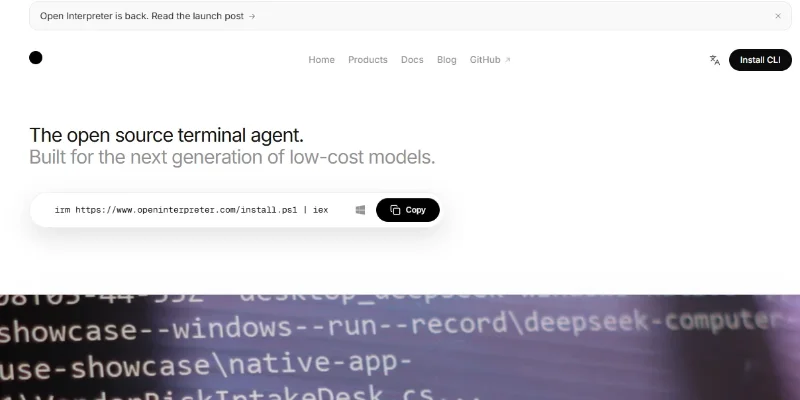
Open Interpreter is an AI-powered computer-use and coding agent designed to connect large language models (LLMs) with real computer operations. Instead of simply generating instructions or suggesting code, it can execute approved tasks directly on a user's machine. Users can describe what they want in natural language, and the agent can interact with files, applications, browser tabs, spreadsheets, PDFs, and other digital resources to complete the requested work.
The platform offers two main experiences: a Desktop App for knowledge workers and a Terminal Coding Agent for developers. The desktop version can automate repetitive office tasks, extract information from documents, organize files, interact with business applications, and perform browser-based workflows. The terminal version can read project files, modify source code, execute commands, and assist with software development.
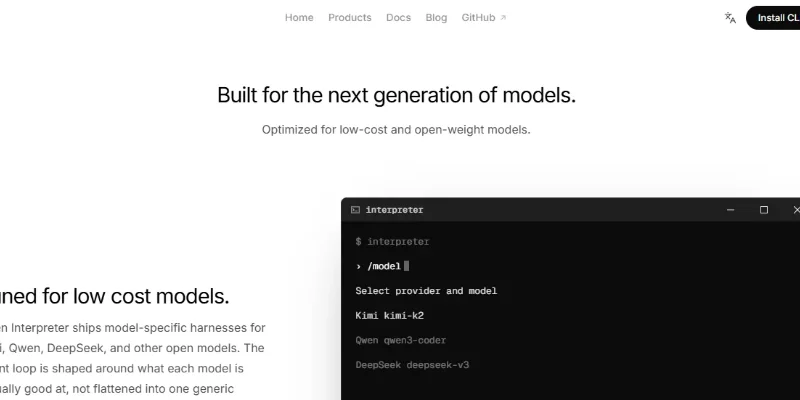
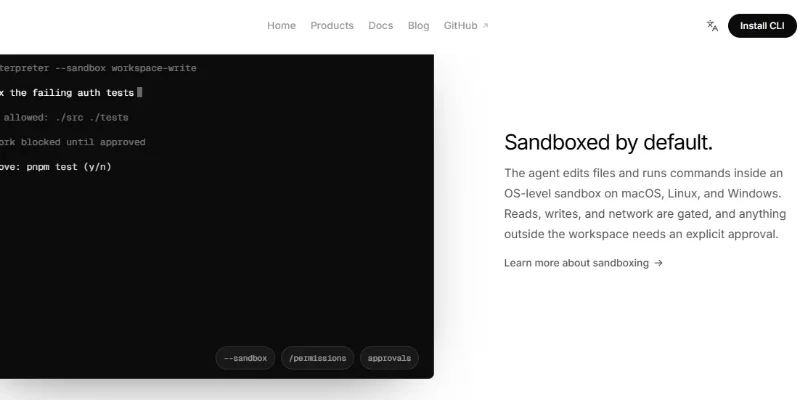
Open Interpreter supports different AI model providers, including OpenAI, Anthropic, OpenRouter, Ollama, and LM Studio, allowing users to select hosted or local models depending on their requirements. It also supports integrations through Model Context Protocol (MCP), reusable skills, and project-specific instructions. Its sandboxing and approval controls help users review potentially sensitive operations before execution.
Verifiable Stats
-
Developer: Open Interpreter open-source project
-
Initial Project: Launched in 2023
-
Platform Type: Open-source AI computer-use agent and coding agent
-
Core Capabilities: Computer automation, code execution, file management, browser automation, data analysis, and document processing
-
Available Versions: Desktop App and Terminal Coding Agent
-
Supported Operating Systems: macOS, Windows, and Linux
-
AI Model Support: OpenAI, Anthropic, OpenRouter, Ollama, LM Studio, and other compatible providers
-
Integrations: MCP servers, reusable agent skills, and external tools
-
Voice Mode: Supports hands-free instructions with local speech transcription in the desktop app
-
License: Apache 2.0 for the open-source terminal project
Screenshots & Demo
Key Features
Core capabilities and functionalities provided by Open Interpreter.
Context-Aware Code Completion & Synthesis
Delivers low-latency inline code completions, multi-token suggestions, and semantic completions customized to the repository context.
Multi-File Codebase Indexing & Exploration
Deeply scans project files, dependency trees, and symbol references to provide comprehensive cross-file edits and refactorings.
Automated Git & Terminal Workflow Automation
Executes shell commands, analyzes test runs, resolves syntax and runtime bugs, and crafts clean commit messages and pull requests.
Architectural Refactoring & Security Audit
Spots security vulnerabilities, dead code paths, and architectural smells, providing one-click semantic fixes and unit tests.
Pros & Cons
Key strengths and potential limitations of Open Interpreter.
What We Like
- Natural-Language Computer Control: Users can describe tasks in everyday language, and Open Interpreter can translate those instructions into computer actions, reducing the need to perform every step manually.
- Open-Source and Customizable: Its open-source foundation allows developers to inspect, modify, extend, and adapt the software for personal or business workflows.
- Local Computer Access: Open Interpreter can work with files, folders, applications, and other resources on a user's computer, making it useful for tasks that require direct access to local data.
- Flexible AI Model Support: It supports multiple AI model providers, including OpenAI, Anthropic, Ollama, and compatible local models, giving users flexibility in choosing their preferred AI setup
- Powerful Code Execution: Developers can use it to write, execute, debug, and modify code, automate scripts, and perform technical tasks through natural-language commands.
Where It Falls Short
- Requires Careful Permission Management: Since Open Interpreter can execute commands and interact with local files, users must review permissions and approve sensitive operations to avoid accidental changes or unwanted actions.
- Technical Setup Can Be Challenging: Installing, configuring AI models, connecting APIs, and setting up integrations may be difficult for non-technical users, particularly when using the terminal version.
- External AI Model Costs: Although the software is open-source, using commercial AI models through API providers can create additional costs based on usage. Local models may also require capable hardware.
- Risk of Incorrect Actions: AI agents can misunderstand instructions, generate incorrect commands, or make mistakes while interacting with applications. Important operations should be reviewed before execution.
- Performance Depends on the AI Model: The quality, speed, and reliability of task execution can vary depending on the selected model, available hardware, and complexity of the workflow.
Use Cases
Discover common workflows and scenarios where Open Interpreter excels.
Desktop Task Automation
Users can automate repetitive computer activities such as opening applications, navigating menus, entering information, organizing folders, and performing routine operations through natural-language instructions.
Automated File Management
Open Interpreter can help organize local files, rename documents, create folders, move files, and sort downloads based on file types, names, or other specified criteria.
Software Development Assistance
Developers can use Open Interpreter to write code, modify existing files, execute scripts, identify errors, and assist with software development tasks through conversational instructions.
Data Analysis and Processing
Users can ask the agent to process datasets, perform calculations, clean spreadsheet information, generate statistical summaries, and prepare structured reports using code execution.
Document Processing
Open Interpreter can help read, extract, organize, and transform information from supported documents, including PDFs, text files, and office documents.
Browser Automation
Users can automate supported browser interactions, navigate websites, fill out forms, collect information, and perform repetitive web-based tasks with AI assistance.
Spreadsheet Automation
Business professionals can use it to process spreadsheet data, clean records, perform calculations, organize tables, and generate reports without manually completing every operation.
Research and Information Gathering
Researchers can use Open Interpreter to browse supported websites, collect information, organize findings, analyze documents, and prepare structured research summaries.
Similar AI Tools

ChatGPT
Research, Write, Code, Analyze, and Create with OpenAI’s Multimodal AI Assistant.

Claude
Write, Code, Analyze, Research, and Automate Complex Tasks with Claude AI.

Grok -AI
Get Real-Time Answers, Research the Web, Code, and Create with Grok AI.

Google - Gemini
Research, Write, Code, and Create with Google’s Multimodal AI Assistant.
Wordware AI
Next-generation AI code assistant with deep multi-file repository understanding.

ChatGOT
Your All-in-One AI Chatbot Assistant
Buda
AI-powered coding companion built for high-velocity software engineering.
Zapier Agents
Next-generation AI code assistant with deep multi-file repository understanding.
Latest from Our Blog
Tips, tutorials and insights about AI tools and how to use them effectively.

ChatGPT for Brand Voice: Can It Sound Like You?

ChatGPT for Marketing: The Complete 2026 Guide

Best AI Tools for Real Estate Agents in 2026: Listings, Leads and Follow-Up