

Qoder
By Qoder
Next-generation AI code assistant with deep multi-file repository understanding.
Overview
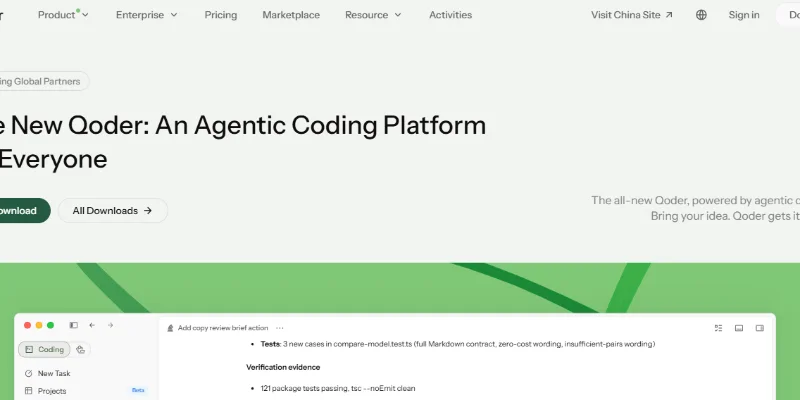
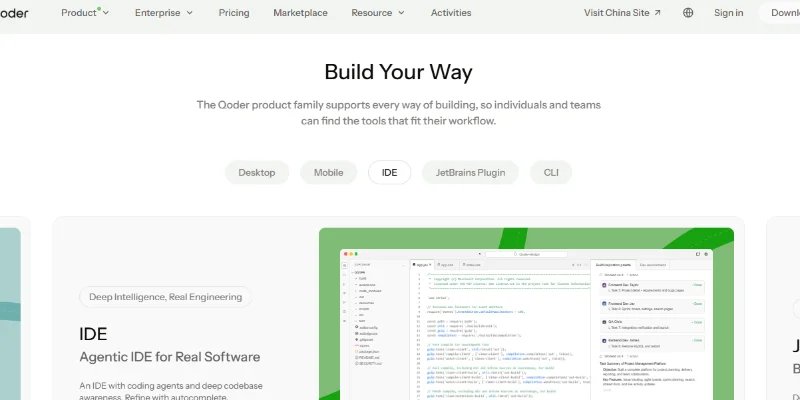
Summary: Qoder is an AI-powered agentic coding platform designed to help developers plan, write, debug, refactor, test, and manage software projects. It combines intelligent coding agents, codebase awareness, automated workflows, and AI-assisted code completion to handle tasks ranging from simple code suggestions to complex, multi-file development. Qoder is available through its desktop application, dedicated IDE, JetBrains plugin, CLI, and mobile app for agent management.
What Is Qoder?
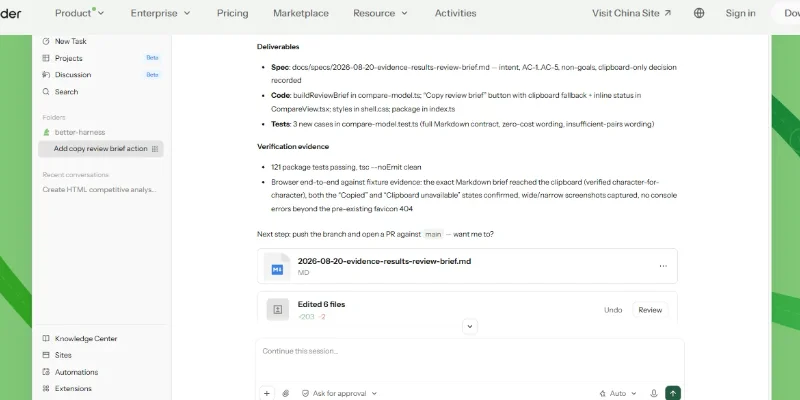
Qoder is an agentic development platform that uses AI to understand software projects and perform coding tasks beyond ordinary autocomplete. Developers can describe a goal in natural language, provide project context, and delegate work to AI agents that plan, edit files, use terminal tools, and validate changes.
Its IDE combines code completion, inline chat, programming assistance, and autonomous Agent Mode. The Ask mode answers technical questions and provides suggestions without modifying code, while Agent mode can execute multi-step tasks such as implementing features, debugging errors, writing tests, and refactoring multiple files.
Qoder also offers project-aware capabilities such as Repo Wiki and Knowledge Cards. Repo Wiki generates structured documentation about a codebase and tracks changes, helping developers understand project architecture and maintain technical context across development tasks.
Beyond its IDE, Qoder provides a JetBrains plugin for developers working in supported JetBrains environments, a command-line interface for terminal-based development, and a mobile application for monitoring agent progress, approving important actions, and reviewing completed work.
For businesses and developers building AI-powered products, Qoder also provides an Agent SDK and Cloud Agents APIs. These allow agent capabilities to be integrated into external applications and managed cloud-based development workflows.
Key Features
1. Autonomous AI Coding Agents: Delegate multi-step programming tasks, including feature development, debugging, code refactoring, and test creation.
2. AI Code Completion: Receive context-aware code suggestions, next-edit predictions, and multi-line code generation while programming.
3. Ask and Agent Modes: Use Ask for programming explanations and suggestions or Agent for autonomous task execution and file modifications.
4. Codebase Understanding: Analyze project structure, dependencies, existing code, and development patterns to provide relevant suggestions.
5. Repo Wiki: Automatically generate and maintain structured documentation about project architecture and implementation details.
6. Multi-File Editing: Make coordinated changes across multiple files to implement features and improve existing code.
7. Integrated Terminal: Allow coding agents to run commands and work with development tools as part of programming workflows.
8. JetBrains Integration: Bring AI coding assistance, project-aware suggestions, and agent capabilities into supported JetBrains IDEs.
9. Qoder CLI: Work with AI agents directly from the terminal for coding, debugging, and development automation.
10. Mobile Agent Management: Monitor agent activities, provide instructions, approve critical actions, and review deliverables from a mobile device.
Screenshots & Demo
Key Features
Core capabilities and functionalities provided by Qoder.
Context-Aware Code Completion & Synthesis
Delivers low-latency inline code completions, multi-token suggestions, and semantic completions customized to the repository context.
Multi-File Codebase Indexing & Exploration
Deeply scans project files, dependency trees, and symbol references to provide comprehensive cross-file edits and refactorings.
Automated Git & Terminal Workflow Automation
Executes shell commands, analyzes test runs, resolves syntax and runtime bugs, and crafts clean commit messages and pull requests.
Architectural Refactoring & Security Audit
Spots security vulnerabilities, dead code paths, and architectural smells, providing one-click semantic fixes and unit tests.
Pros & Cons
Key strengths and potential limitations of Qoder.
What We Like
- Autonomous AI Coding Agents: Qoder can handle multi-step development tasks, including implementing features, fixing bugs, modifying files, and running tests, reducing repetitive manual work.
- Deep Codebase Understanding: Its project-aware capabilities help agents understand repository structure, existing code, and project context, making suggestions more relevant to the software being developed.
- Multiple Development Environments: Qoder offers a desktop application, AI-powered IDE, JetBrains plugin, and CLI, giving developers different ways to work with AI coding agents.
- Advanced Project Documentation: Features such as Repo Wiki and Knowledge Cards help organize project knowledge and generate structured documentation, making large codebases easier to understand.
- Flexible Model Usage: The Free plan supports Bring Your Own Key (BYOK), allowing users to connect supported model providers and choose their preferred model setup.
Where It Falls Short
- Limited Free-Plan Usage: The free plan restricts code completions, next-edit suggestions, and basic-model messages. Developers who need more extensive agent assistance may require a paid subscription
- Credit Consumption Can Be High: Agent requests and premium models consume credits based on usage. Complex or long-running development tasks may use credits faster than expected.
- Advanced Features Require Paid Plans: Features such as Quest, Repo Wiki, and Knowledge Cards are included in paid individual subscriptions rather than the standard free offering.
- Generated Code Requires Review: AI agents can make incorrect assumptions, introduce bugs, or produce code that needs refinement. Developers must inspect changes and validate results before deployment.
- Subscription Costs Can Increase: Paid plans start at $20/month, with Pro+ at $60/month and Ultra at $200/month. Heavy users may also need additional credit packs.
Use Cases
Discover common workflows and scenarios where Qoder excels.
AI-Powered Application Development
Build web applications, software products, and internal tools by describing requirements in natural language and allowing Qoder's agents to implement the code.
Website Development
Create website features, modify frontend components, improve layouts, and work on backend functionality with AI-assisted coding.
Automated Bug Fixing
Analyze existing code, investigate errors, identify potential causes, and implement fixes to improve application stability.
Code Refactoring and Optimization
Improve code structure, simplify complex functions, reduce duplication, and make existing projects easier to maintain.
Software Testing
Generate tests, execute development commands, and verify code changes to help developers identify issues during software development.
Understanding Large Codebases
Analyze repository structure, explore dependencies, and use project documentation features such as Repo Wiki to understand unfamiliar codebases.
API Development and Integration
Develop API endpoints, connect application components, and modify existing integrations with AI-assisted coding workflows.
Multi-File Feature Implementation
Delegate complex development tasks that require coordinated changes across multiple files, components, or modules.
Similar AI Tools
KiloClaw
AI-powered coding companion built for high-velocity software engineering.

Thoth Ai
AI Training Data & Model Reliability Platform

DeepSeek
Open-Source, High-Efficiency AI Models & Advanced Reasoning Engine

Vynaris
Hosted uncensored models for authorized security testing and research.

MCPhq
25,000+ MCP servers, ranked by installs and commit freshness.

Erius Phone
Virtual phone infrastructure for AI agents.

SendHQ
Email API for developers and AI agents.

BlazePhoenix
On-chain DEX quotes and staking. No keys, no servers.
Latest from Our Blog
Tips, tutorials and insights about AI tools and how to use them effectively.

ChatGPT for Brand Voice: Can It Sound Like You?

ChatGPT for Marketing: The Complete 2026 Guide

Best AI Tools for Real Estate Agents in 2026: Listings, Leads and Follow-Up
