

ZCode
By ZCode
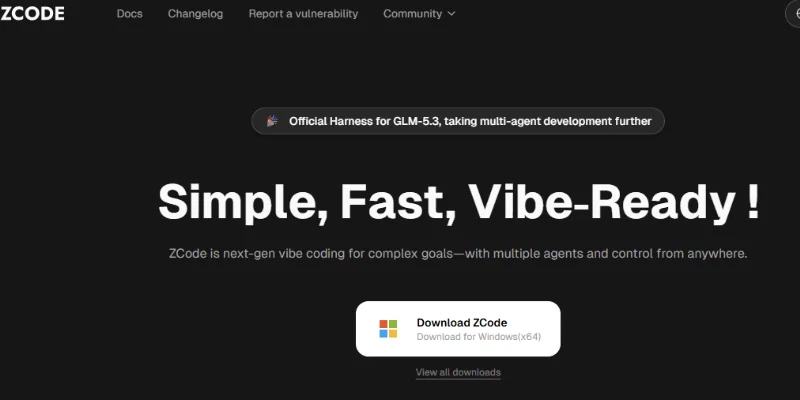
Next-generation AI code assistant with deep multi-file repository understanding.
Overview
Summary: ZCode is an AI-powered Agentic Development Environment (ADE) developed by Z.AI, designed to help developers build, modify, debug, test, and review software projects using natural-language instructions. Unlike traditional code editors that primarily focus on manual programming and code completion, ZCode places AI coding agents at the center of the development workflow. Its built-in ZCode Agent works with project files, terminal commands, browser previews, and Git tools to handle complex, multi-step development tasks. It also supports other coding agents and frameworks, including Claude Code, OpenAI Codex, Gemini CLI, and OpenCode, allowing developers to choose different agents for their projects.
What Is ZCode?
ZCode is a desktop-based AI development environment that simplifies software development through autonomous and collaborative AI agents. Users can describe what they want to build or fix in everyday language, and the AI agent can analyze the project, understand its structure, create an implementation plan, modify files, execute commands, and verify the results. This makes it useful for both routine coding activities and complex engineering projects.
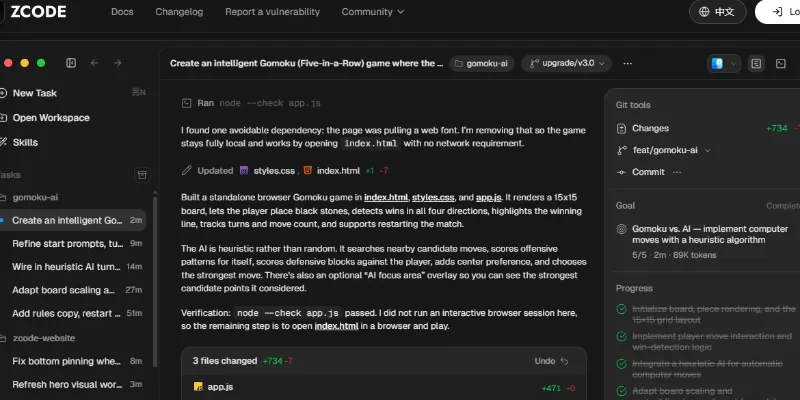
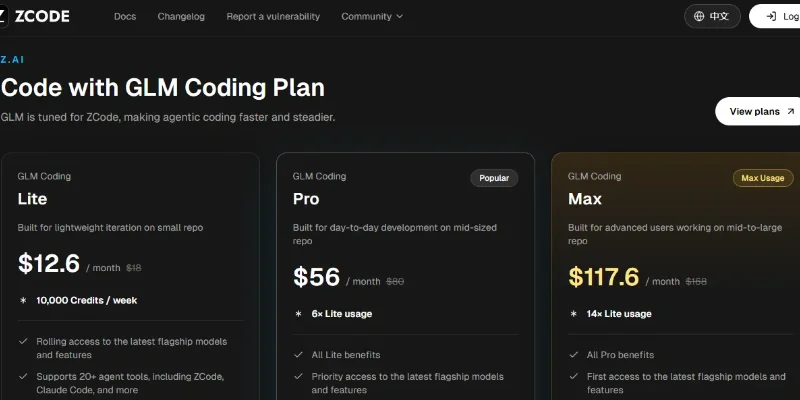
One of its main components is the ZCode Agent, a self-developed coding agent deeply integrated with the GLM-5.3 model family. It is designed for long-running development tasks that involve multiple files, complex project requirements, repeated code changes, and testing. The agent maintains task context across project files, terminal outputs, browser activity, and Git state, helping developers continue work without repeatedly explaining the project.
ZCode also provides a multi-agent framework that allows developers to work with different coding agents, including Claude Code, Codex, Gemini CLI, and OpenCode. Developers can select an appropriate agent based on the complexity and requirements of their projects. Its built-in terminal, file management, Git integration, browser automation, and review panel bring important development activities into one workspace.
Another important capability is browser-based testing and preview. The AI agent can open websites, interact with web pages, fill out forms, click buttons, take screenshots, and inspect the results of frontend changes. ZCode also includes execution modes such as Ask Before Changes, Edit Automatically, Plan Mode, and Full Access, allowing developers to control how much independence an AI agent has when editing files or running commands.
ZCode is suitable for software developers, programmers, frontend and backend engineers, startups, and development teams looking to accelerate coding workflows. It supports desktop operating systems including Windows, macOS, and Linux, with remote-control capabilities that allow users to follow up on ongoing development tasks through supported mobile and messaging integrations.
Verifiable Stats
-
Tool Name: ZCode.
-
Developer: Z.AI.
-
Official Website: https://zcode.z.ai/en
-
Tool Type: Agentic Development Environment (ADE) and AI Coding Assistant.
-
Core AI Agent: ZCode Agent, deeply integrated with the GLM-5.3 model family.
-
Multi-Agent Support: Supports ZCode Agent, Claude Code, OpenAI Codex, Gemini CLI, and OpenCode.
-
Development Capabilities: Code generation, debugging, project analysis, multi-file editing, testing, and code review.
-
Built-in Tools: File management, terminal, Git integration, browser preview, and browser automation.
-
Execution Controls: Ask Before Changes, Edit Automatically, Plan Mode, and Full Access.
-
Supported Operating Systems: Windows, macOS, and Linux.
Screenshots & Demo
Key Features
Core capabilities and functionalities provided by ZCode.
Context-Aware Code Completion & Synthesis
Delivers low-latency inline code completions, multi-token suggestions, and semantic completions customized to the repository context.
Multi-File Codebase Indexing & Exploration
Deeply scans project files, dependency trees, and symbol references to provide comprehensive cross-file edits and refactorings.
Automated Git & Terminal Workflow Automation
Executes shell commands, analyzes test runs, resolves syntax and runtime bugs, and crafts clean commit messages and pull requests.
Architectural Refactoring & Security Audit
Spots security vulnerabilities, dead code paths, and architectural smells, providing one-click semantic fixes and unit tests.
Pros & Cons
Key strengths and potential limitations of ZCode.
What We Like
- Autonomous Multi-Step Coding: ZCode can understand project requirements, plan tasks, modify multiple files, execute commands, and verify implementation, reducing repetitive manual development work.
- Multiple AI Coding Agents: It supports ZCode Agent, Claude Code, OpenAI Codex, Gemini CLI, and OpenCode, giving developers flexibility to choose an agent for different programming tasks.
- Integrated Development Workspace: Built-in file management, terminal, Git tools, browser preview, and code review help developers manage several development activities without constantly switching applications.
- Advanced Browser Testing: Its AI agent can open websites, interact with web pages, fill forms, take screenshots, and verify frontend changes directly through the built-in browser.
- Flexible Execution Controls: Ask Before Changes, Edit Automatically, Plan Mode, and Full Access let developers control how independently the AI can modify files and execute commands.
Where It Falls Short
- Separate Model Subscription May Be Required: Although the ZCode application is free, users generally need an API key, model-provider subscription, or other model access to use AI coding features. This can increase the overall cost.
- Potentially Risky Automated Changes: AI agents can modify project files and execute terminal commands. Developers need to review changes and configure permissions carefully, particularly when working with production code.
- Learning Curve for Beginners: Understanding agent frameworks, model configuration, execution modes, Git workflows, and project context may take time for users new to AI-assisted development.
- Performance Depends on the Selected Model: Coding quality, response speed, and task completion can vary depending on the connected AI model, available usage quota, and complexity of the project.
- Desktop-Based Workflow: ZCode requires a desktop application for its main development experience. Developers who prefer a lightweight, entirely browser-based coding environment may find this less convenient.
Use Cases
Discover common workflows and scenarios where ZCode excels.
AI-Powered Code Generation
Developers can describe application requirements in natural language and use ZCode to generate functions, components, scripts, and complete project structures, reducing repetitive manual coding.
Website and Web Application Development
Frontend and full-stack developers can build websites, dashboards, landing pages, and interactive web applications by instructing AI agents to create and modify project files.
Debugging and Error Resolution
Developers can ask ZCode to investigate coding errors, analyze terminal output, identify potential issues, modify affected files, and run tests to verify fixes.
Automated Software Testing
Development teams can use its terminal and browser capabilities to execute test commands, interact with web applications, inspect screenshots, and validate frontend functionality.
Code Refactoring and Optimization
Programmers can use ZCode to restructure existing code, improve readability, reduce duplication, and make coordinated changes across multiple files while maintaining project consistency.
Multi-Agent Software Development
Developers can work with different coding agents, including ZCode Agent, Claude Code, OpenAI Codex, Gemini CLI, and OpenCode, to approach programming tasks using different AI tools.
Frontend Design and UI Improvements
UI developers can request changes to layouts, navigation menus, buttons, forms, responsive components, and visual elements, then preview the updated website through the integrated browser.
Git-Based Project Management
Software engineers can review code changes, inspect project modifications, and work with Git-related operations while managing AI-assisted development tasks.
Similar AI Tools
cursor
The AI-first code editor built for lightning-fast engineering speed.
Open AI Codex
Intelligent developer copilot automating code completion, refactoring, and debugging.
Devin AI
Autonomous AI software engineering agent capable of planning, solving complex tasks, and executing terminal benchmarks.
Zed AI
High-Performance AI Code Assistant & Inline Edit for the Zed Editor
Sourcegraph Cody
Context-aware software development platform for rapid engineering workflows.

Thoth Ai
AI Training Data & Model Reliability Platform

DeepSeek
Open-Source, High-Efficiency AI Models & Advanced Reasoning Engine

Vynaris
Hosted uncensored models for authorized security testing and research.
Latest from Our Blog
Tips, tutorials and insights about AI tools and how to use them effectively.

ChatGPT for Brand Voice: Can It Sound Like You?

ChatGPT for Marketing: The Complete 2026 Guide

Best AI Tools for Real Estate Agents in 2026: Listings, Leads and Follow-Up

Google Gemini vs ChatGPT: Which AI Assistant Should You Actually Use?
Reviews & Community Ratings
No reviews yet — be the first to rate and review this tool!
Rate ZCode
Community Reviews (0)